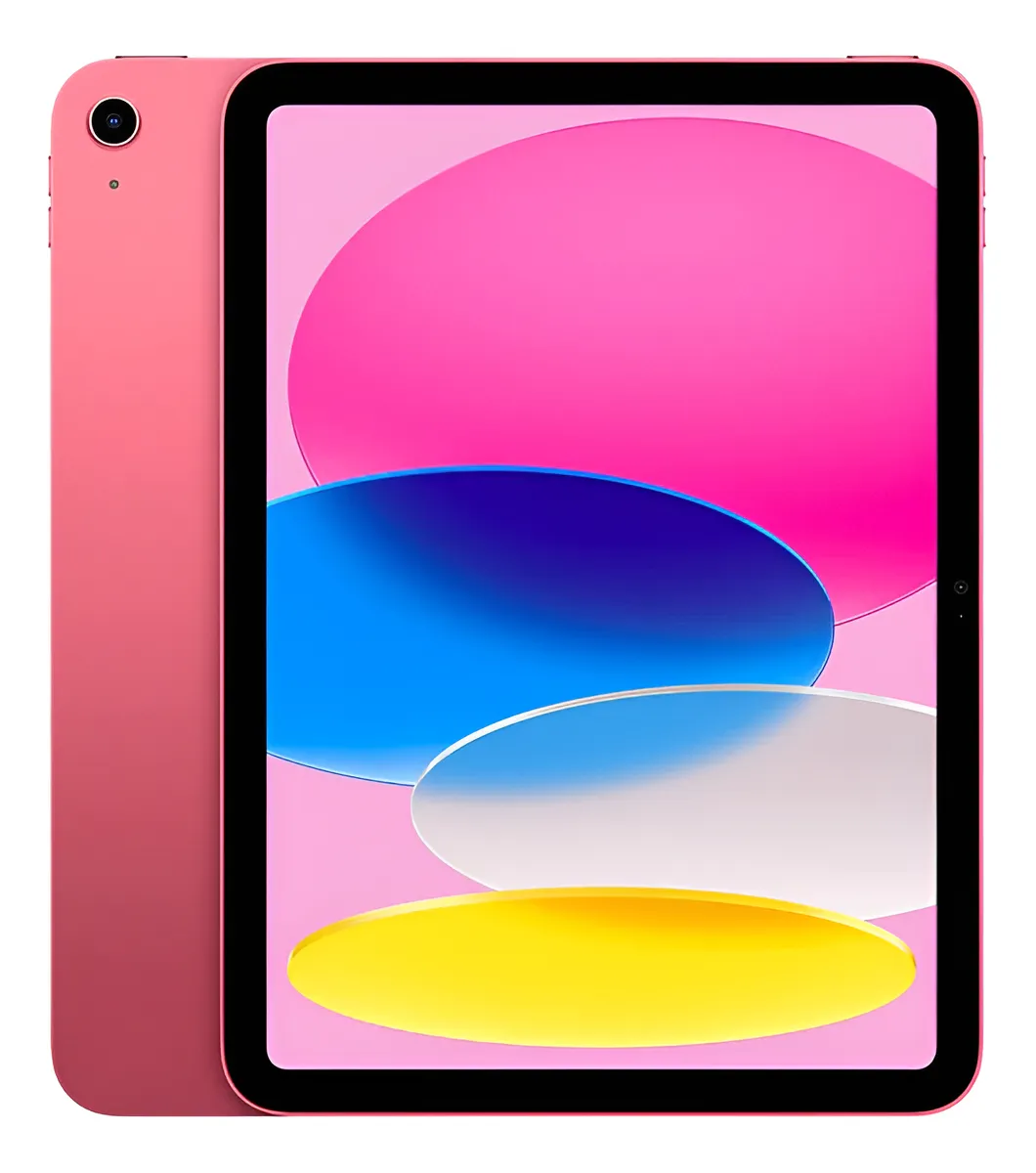
A practical look at Apple’s 11-inch iPad with A16 chip, 128GB storage, Wi-Fi connectivity and pink finish for students, work, streaming, notes and daily apps.
The iPad 11 Wi-Fi 128GB Pink is worth considering if you want a modern Apple tablet for everyday use, study, entertainment, video calls and light creative work without moving into the more advanced iPad Air or iPad Pro line. It makes the most sense for users who value a large, sharp screen, smooth app performance, USB-C charging, Apple Pencil support and a clean iPadOS experience. It is not the best choice if you need cellular data, professional-grade display features, heavy creative workflows or Apple Intelligence features.
The iPad 11 Wi-Fi 128GB Pink sits in the sweet spot for people who want an iPad that feels current, fast and flexible, but do not necessarily need the most powerful Apple tablet available. Its main appeal is simple: it gives you the familiar iPad experience with an 11-inch Liquid Retina display, A16 chip, 128GB storage and a light, colorful design that works well for daily routines.
This is the kind of tablet that fits naturally into school, home, travel and casual productivity. It can replace a basic laptop for some light tasks, work as a comfortable streaming screen, become a note-taking device with Apple Pencil, and handle video calls with a front camera placed in a more natural landscape position.
How the iPad 11 Wi-Fi 128GB Pink fits into daily use
The iPad 11 Wi-Fi 128GB Pink is Apple’s mainstream tablet for users who want a balanced device rather than a specialized one. It is not positioned as a professional workstation, but it is far from a basic screen for watching videos. The A16 chip gives it enough power for browsing, messaging, studying, reading, casual gaming, streaming, document editing and common creative apps.
The 11-inch Liquid Retina display is one of its strongest practical advantages. It is large enough to read comfortably, split attention between content and notes, watch videos without feeling cramped, and use drawing or writing apps with more space than a phone or small tablet can offer.
The pink finish is mostly a design choice, but it gives the device a softer and more personal look. For users who care about aesthetics, desk setup, school accessories or a lighter visual style, the color can be part of the appeal without changing the core performance.
The Wi-Fi version is best understood as a home, office, school or hotspot-connected iPad. It does not include mobile network access on its own, so it makes more sense for people who usually have reliable Wi-Fi or are comfortable sharing internet from a phone when needed.
The storage and connectivity choices that can change the experience
The detail that deserves attention before ordering this model is the combination of 128GB storage and Wi-Fi-only connectivity. For many users, 128GB is a comfortable starting point because it offers room for apps, documents, photos, offline videos, school files and casual creative projects.
It is still important to think about how you use storage. If you download many large games, keep a heavy video library offline, edit long videos, or store years of photos directly on the tablet, 128GB can start to feel tighter over time. For cloud-based use, streaming, reading, note-taking and everyday productivity, it is usually a much more reasonable configuration.
The Wi-Fi-only setup is another decision point. It is simpler and works well for most indoor routines, but it may frustrate people who want internet anywhere without depending on a phone hotspot. If you travel often, work outdoors, or need maps and connection while moving, a cellular model may be a better fit.
This model also uses USB-C, which is more convenient than older Lightning-based iPads. Charging is easier, accessory compatibility is broader, and the port can support external display output. The practical detail to remember is that this remains an everyday iPad, not a high-speed professional transfer device for demanding media workflows.
What feels strong in real everyday use
The biggest strength of this iPad is how naturally it handles common tasks. Opening apps, switching between browser tabs, editing documents, joining calls, watching videos and managing school or work notes should feel fluid for the type of user this tablet is designed for.
The A16 chip is a meaningful advantage over older entry-level iPads. It gives the device better long-term comfort for iPadOS updates, multitasking and more demanding apps. It also helps with photo features, video playback, casual editing and games that need more graphics power than basic tablets can offer.
The screen is another practical win. The Liquid Retina panel has a sharp 2360-by-1640 resolution, True Tone support and good brightness for indoor use. Text looks clean, videos have enough detail, and the 11-inch size makes the iPad more comfortable for reading, studying and multitasking than smaller screens.
The landscape front camera is especially useful. When the iPad is used horizontally with a keyboard case, stand or cover, video calls look more natural because the camera sits in a better position. Center Stage also helps keep the person in frame during calls, which is useful for online classes, meetings and family conversations.
Touch ID in the top button is another small but practical feature. It keeps unlocking fast and secure without needing Face ID. For shared home use, school use or quick app access, it keeps the experience simple.
Trade-offs to understand before choosing this model
The iPad 11 Wi-Fi 128GB Pink is strong for everyday use, but it is not designed to satisfy every type of buyer. The first trade-off is that it does not belong to Apple’s most advanced iPad lines. Users expecting laptop-level creative power, premium display technology or professional workflows should look higher in the lineup.
The display is sharp and pleasant, but it does not offer every advanced screen feature found on premium models. If you are sensitive to refresh rate, need the best color workflow for professional visual work, or want the most advanced display Apple offers on an iPad, this model may feel too mainstream.
Accessory support is useful, but it also requires attention. The iPad supports Apple Pencil USB-C and Apple Pencil 1st generation, but users coming from another iPad should check exactly which Pencil they already own. Not every Apple Pencil works with every iPad, and buying the wrong accessory is one of the easiest mistakes to make.
Another point is the absence of built-in mobile data in this Wi-Fi configuration. It can connect perfectly over Wi-Fi, but it does not replace the independence of a cellular tablet. This matters most for people who plan to use it away from home or work without relying on another device for internet.
It is also not the model to choose if Apple Intelligence is a priority. The A16 iPad is powerful for daily use, but Apple’s AI feature support is reserved for selected devices with compatible chips. For buyers focused specifically on those features, this is a key distinction.
A16 performance, display quality and battery expectations
The A16 chip combines a 5-core CPU, 4-core GPU and 16-core Neural Engine. In practical terms, that means the iPad is built for smooth daily use rather than extreme professional workloads. It handles everyday productivity, streaming, web browsing, app switching and casual content creation with confidence.
For students, the performance profile is very appealing. Notes, PDFs, presentations, browser research, video classes and productivity apps are exactly the kind of tasks this model is meant to manage well. Add a compatible keyboard and Apple Pencil, and the iPad becomes much more flexible for school and university routines.
For entertainment, the display and landscape stereo speakers help make the device more enjoyable. The screen is large enough for series, movies, sports, YouTube, social media and games, while the speakers are better positioned when holding the tablet horizontally.
The rear 12MP Wide camera is useful for scanning documents, taking quick photos, recording 4K video and capturing visual references. It is not a replacement for a dedicated professional camera, but it is more than enough for school projects, quick content, forms, receipts and casual recording.
The front 12MP Center Stage camera is arguably more important for most buyers. It makes video calls, online classes and remote meetings feel more natural. The camera placement in landscape orientation is a real quality-of-life improvement for anyone who uses the iPad on a desk.
Battery life is designed around all-day casual use, with up to 10 hours of web browsing on Wi-Fi or video playback depending on usage. Real results will vary with brightness, apps, games, calls and background activity, but the expectation is that it can cover a normal day of mixed use for many people.
The users who will get the most from this iPad
This iPad makes strong sense for students who need a reliable device for notes, reading, research, online classes and assignments. It is easier to carry than a laptop, more versatile than a phone, and powerful enough for the daily academic tasks most people actually do.
It also works well for families. The screen size is comfortable for streaming, educational apps, games, reading and video calls. Touch ID, iPadOS parental tools and the large app ecosystem make it a practical shared tablet when configured properly.
For professionals with light workflows, it can be a very convenient secondary device. It is useful for email, calendar, document review, presentations, note-taking, calls and travel. It is not meant to replace a full professional computer for everyone, but it can reduce how often a laptop is needed for simple tasks.
Creative users with moderate needs can also enjoy it. Drawing, handwriting, basic photo adjustments, short video edits and brainstorming work well, especially with a compatible Apple Pencil. The key is to keep expectations aligned with an everyday iPad rather than a Pro-level creative station.
The pink color also makes it attractive for buyers who want a device that feels less corporate and more personal. It can match cases, desk accessories and school setups nicely, while still offering the same hardware experience as the other colors in the line.
When another iPad may be the smarter move
This model is not ideal for users who need mobile internet built into the tablet. If you want to use the iPad frequently outside Wi-Fi coverage without depending on a phone hotspot, the Wi-Fi configuration can become inconvenient.
It may also be the wrong choice for professional designers, video editors, illustrators or photographers who need the best display technology, maximum performance headroom and the most advanced Apple Pencil experience. Those users should compare it with higher-end iPad models before deciding.
People who want a laptop replacement should be realistic as well. With a keyboard, the iPad becomes much more productive, but iPadOS still works differently from desktop operating systems. It is excellent for many tasks, but some professional software, file workflows and external monitor habits may still feel better on a traditional computer.
Heavy storage users should also think carefully. The 128GB capacity is practical for many people, but it is not unlimited. If your tablet will hold large video files, many downloaded games or extensive offline media, a larger storage configuration may age better.
Finally, users who specifically want Apple Intelligence features should not treat this as the safest path. The iPad 11 with A16 is a capable device, but its main strengths are everyday performance, portability, screen quality and iPadOS versatility, not Apple’s newest AI-focused feature set.
How it compares with simpler tablets and higher-end iPads
Compared with simpler tablets, the iPad 11 Wi-Fi 128GB Pink stands out through performance, app quality, long-term software experience and accessory ecosystem. The combination of A16 chip, iPadOS, USB-C, Apple Pencil support and Magic Keyboard Folio compatibility gives it a more complete productivity and creativity angle.
Compared with older iPads, the larger modern design, USB-C port, landscape front camera and stronger chip are important improvements. Users upgrading from an older model may notice a cleaner look, better video call position, faster app handling and more comfortable screen space.
Compared with the iPad Air, this model is more focused on mainstream use. The Air line is better for users who want more performance headroom, more advanced accessory compatibility and a stronger creative or productivity profile. The standard iPad is better for people who want the core iPad experience without paying for capabilities they may not use.
Compared with the iPad Pro, the difference is even clearer. The Pro line is built for users who need premium display technology, high-end performance and advanced workflows. The iPad 11 is more rational for everyday users who want a capable tablet for practical tasks, not a professional workstation.
Compared with a laptop, the iPad wins in portability, touch interaction, reading comfort, handwritten notes and casual use. A laptop still wins for certain desktop workflows, advanced file management and specific professional programs. The better choice depends less on raw power and more on how you actually work.
The buying decision comes down to realistic expectations
The iPad 11 Wi-Fi 128GB Pink is a strong choice when the goal is a modern, reliable and attractive iPad for daily life. It is fast enough for common apps, comfortable for streaming and reading, practical for calls, useful for study, and flexible enough to become more productive with the right accessories.
Its strongest argument is balance. It does not try to be the most advanced iPad, and that is exactly why it works for so many people. The screen is pleasant, the A16 chip is capable, 128GB is a sensible starting point, and the overall experience feels current without being excessive.
The main caution is choosing it for the right reason. It is a great everyday iPad, not a cellular-first travel tablet, not a professional creative workstation, and not the best option for users who specifically want Apple Intelligence. If those points do not matter to you, the device becomes much easier to recommend.
For students, families, casual creators and everyday Apple users, this model offers a clean and dependable route into the iPad ecosystem. The pink finish adds personality, but the real value is in the combination of screen size, performance, storage and software experience.
Is the iPad 11 Wi-Fi 128GB Pink good for students?
Yes, it is a strong option for students who need a tablet for notes, reading, research, online classes and assignments. The 11-inch screen gives enough room for documents and study apps, while the A16 chip keeps daily tasks smooth. With a compatible Apple Pencil and keyboard, it becomes much more useful for school or university routines.
Does the iPad 11 Wi-Fi 128GB Pink support Apple Pencil?
Yes, it supports Apple Pencil USB-C and Apple Pencil 1st generation. This makes it useful for handwriting, sketches, document markup and study notes. The important detail is compatibility: users should check the exact Pencil model before buying an accessory, because Apple Pencil support varies between different iPad generations and models.
Is 128GB enough storage for this iPad?
Yes, 128GB is enough for many users who stream content, use cloud storage, install common apps and keep a moderate amount of files offline. It may feel limited for people who download many large games, keep lots of videos on the device, or work with heavy media files. Usage habits matter more than the number alone.
Can the iPad 11 Wi-Fi 128GB Pink replace a laptop?
Yes, it can replace a laptop for some light users, but not for everyone. It works well for email, notes, documents, browsing, video calls and presentations, especially with a keyboard. A traditional laptop is still better for certain desktop programs, advanced file workflows and professional tasks that require a full computer environment.
Is the Wi-Fi version enough for travel?
Yes, the Wi-Fi version can work well for travel if you usually have hotel, airport, home or phone hotspot access. It is less convenient if you need constant internet away from Wi-Fi. Users who want the tablet to stay connected independently should consider a cellular configuration instead of relying only on shared internet.
How good is the screen on the iPad 11?
The screen is very good for everyday use, with an 11-inch Liquid Retina display, sharp resolution, True Tone and comfortable brightness for indoor environments. It is ideal for streaming, reading, browsing, studying and casual creative work. It is not positioned as Apple’s most advanced iPad display, but it delivers a polished mainstream experience.
Is the iPad 11 with A16 good for gaming?
Yes, it is good for casual and many mainstream games thanks to the A16 chip and large display. It should handle popular games well, although the experience depends on each title’s graphics demands and settings. Users focused on the heaviest gaming performance may prefer a more powerful iPad, but most casual players will be satisfied.
Who should avoid this iPad model?
Users should avoid it if they need built-in cellular data, professional-grade display features, large local storage for heavy files, or Apple Intelligence support. It may also be too limited for demanding creative professionals. For everyday study, entertainment, video calls and light productivity, however, it remains a very practical and well-balanced tablet.
The iPad 11 Wi-Fi 128GB Pink is best understood as a dependable everyday iPad with a modern design, strong app experience and enough performance for the routines most people care about. It is easy to recommend for students, families, casual creators and users who want a clean Apple tablet for daily use.
Choose it if you want a balanced iPad for streaming, reading, notes, calls, browsing and light work, especially if Wi-Fi connectivity is enough for your routine. Choose another model if you need mobile data, advanced creative performance, premium display features or a more future-focused AI feature set.
For the right user, this iPad delivers exactly what matters: a sharp screen, smooth performance, practical storage, USB-C convenience, Apple Pencil support and a design that feels current. The pink version adds personality, but the main reason to choose it is the solid everyday experience behind the color.