



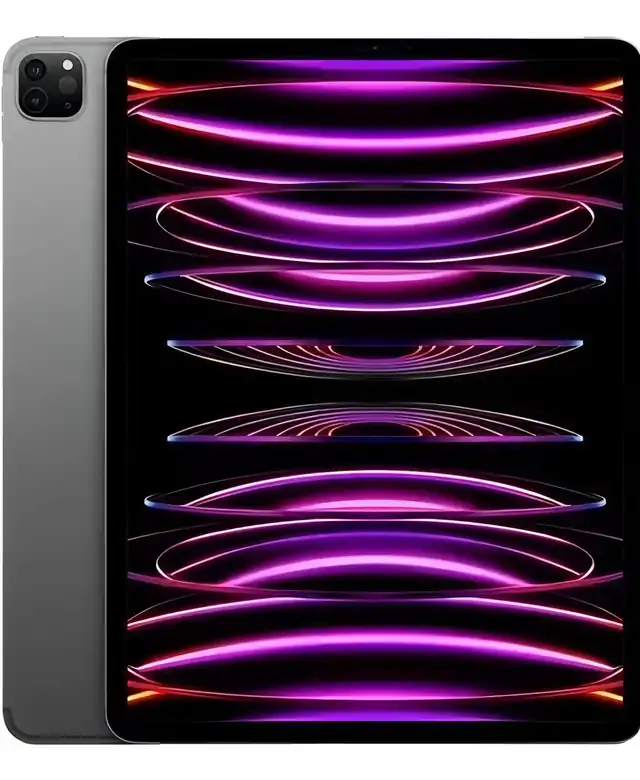
A practical look at the Space Gray 256GB iPad Pro A2436 with M2 chip, large Liquid Retina XDR display and refurbished “Excellent” condition.
The iPad Pro 12.9 6th Generation 2022 is worth considering if you want a premium tablet for productivity, drawing, studying, editing, streaming and multitasking without moving to a newer Pro model. The refurbished A2436 version makes the most sense for users who care about the large XDR display, M2 performance, Apple Pencil support and a desktop-like workflow. It is not the best choice if you need cellular data, a compact tablet or a device with a battery as fresh as a sealed new unit.
This iPad Pro 12.9 6th Generation 2022 review focuses on the refurbished A2436 model with 256GB of storage, 8GB of RAM and Space Gray finish. It is a high-end iPad built for people who want more than basic browsing, video calls and casual entertainment.
The main decision is not only whether the M2 iPad Pro is powerful enough. It clearly is. The more important question is whether this refurbished “Excellent” unit fits your routine, your accessories, your comfort with a large screen and your expectations about battery health and cosmetic condition.
What the M2 iPad Pro A2436 brings to daily use
The iPad Pro A2436 is the Wi-Fi version of the 12.9-inch iPad Pro released in 2022. In this configuration, it combines 256GB of internal storage with 8GB of RAM, which is a strong setup for most creative, academic and professional workflows on iPadOS.
The Apple M2 chip is the central reason this model still feels current. It gives the tablet enough power for heavy multitasking, photo editing, illustration, note-taking, large documents, video work and demanding apps. For many users, the performance gap between this model and a standard tablet will be very clear.
The 12.9-inch Liquid Retina XDR display is another major selling point. It uses mini-LED technology, has high contrast, supports ProMotion, wide color and True Tone, and is especially appealing for people who watch HDR content, edit images, draw, read PDFs or keep multiple app windows open.
The large panel makes the iPad feel closer to a portable workstation than a simple media device. It gives more room for split-screen work, digital notebooks, timelines, design apps and web-based dashboards. That extra space is useful, but it also makes the device less comfortable for long handheld use.
The A2436 model is better understood as a powerful Wi-Fi tablet for home, office, classroom, studio or travel with hotspot access. If mobile data without a phone nearby is essential, this specific model is not the ideal version to prioritize.
The refurbished condition is the detail that deserves the most attention
With this product, the biggest buying mistake is judging it only as an iPad Pro and forgetting that it is a refurbished unit. The listed condition is “Excellent,” which usually indicates a device that has been inspected and prepared for use, with a screen described as clean and only subtle signs of use.
That is encouraging, but it does not make the unit identical to a sealed new product. A refurbished iPad can be a smart purchase when the condition is transparent, the battery health is acceptable and the seller’s return process gives the buyer enough confidence.
The listing indicates battery capacity above 80%. That is an important detail because battery behavior affects the real experience more than many specifications. The iPad Pro can still deliver strong battery life in normal use, but a refurbished battery may not behave like a brand-new one after years of cycles.
For light use, such as reading, browsing, streaming and note-taking, that battery condition may be perfectly acceptable. For heavy editing, long video calls, brightness-heavy HDR use or full workdays away from a charger, expectations should be more realistic.
The screen condition also matters because the 12.9-inch display is one of the main reasons to choose this model. Before relying on the device for drawing or visual work, it makes sense to check for uneven brightness, touch response, dead pixels, pressure marks and any visible wear that may affect daily comfort.
Where this iPad feels especially strong
The first major strength is performance headroom. The M2 chip gives the iPad Pro enough breathing room for demanding apps and future iPadOS updates. It is the kind of tablet that can handle many years of normal productivity use without feeling underpowered too quickly.
The second strength is the display. The 12.9-inch XDR screen is excellent for people who spend a lot of time reading, editing, drawing or watching high-quality video. It is bright, sharp, fluid and spacious, with a more premium visual feel than standard iPad screens.
The third strength is accessory flexibility. This model supports Apple Pencil options, including hover functionality with compatible Pencil use, and works well with keyboard and trackpad setups. When paired with the right accessories, it becomes far more capable for writing, planning, sketching and managing work.
The fourth strength is storage balance. The 256GB version is a practical middle ground for many users. It gives more flexibility than an entry storage model for apps, offline files, photos, design assets, notes, documents and media, without pushing into configurations aimed at very heavy local storage needs.
Audio and cameras also support the premium feel. The four-speaker system is strong for streaming, calls and presentations, while the TrueDepth front camera with Center Stage is useful for video meetings and online classes. The rear camera system is not the main reason to buy it, but it is capable for scanning, quick photos, video capture and augmented reality tasks.
The Thunderbolt and USB 4 port adds another advantage for users who connect external drives, displays, hubs or compatible accessories. This matters if the iPad will be part of a more serious work setup rather than only a couch or travel device.
Where the reconditioned A2436 asks for caution
The first trade-off is size. The 12.9-inch iPad Pro is impressive on a desk, but it is not the most comfortable tablet to hold for long periods. If your use is mostly reading in bed, casual browsing, gaming on the sofa or carrying the device everywhere, the large format may feel heavy and less practical.
The second trade-off is the Wi-Fi-only nature of the A2436 model. It is excellent if you mainly use stable wireless networks. It is less convenient if you travel frequently, work outdoors, attend events or need independent mobile data without depending on a phone hotspot.
The third point is refurbished battery behavior. A battery above 80% can still be usable, but it naturally gives less certainty than a new battery. This is not necessarily a problem, but buyers should align expectations with the fact that this is a pre-owned device restored for resale.
The fourth point is iPadOS itself. The iPad Pro has laptop-class power, but the operating system still feels different from a full desktop system. It is excellent for many tasks, yet some professional workflows remain easier on a Mac or Windows laptop, especially when they depend on desktop software, complex file handling or specialized plugins.
Another point of attention is accessory cost and compatibility. The best experience often depends on a keyboard case, Apple Pencil and protective cover. Without them, the iPad is still powerful, but many of its productivity advantages become less complete.
Performance, screen and hardware in real terms
The M2 chip includes an 8-core CPU, 10-core GPU and a Neural Engine designed for fast machine learning tasks. In daily use, this means quick app launches, smooth multitasking, responsive drawing, strong media editing and excellent performance in demanding creative apps.
With 8GB of RAM in the 256GB configuration, this model is well positioned for most iPad workflows. It can keep multiple apps active, handle large files more comfortably than basic tablets and support demanding creative projects. Users working with very large video files or huge project libraries may still prefer higher storage versions.
The display resolution, high refresh rate and XDR capability make the 12.9-inch screen one of the defining parts of the experience. Text looks sharp, motion feels fluid and visual work benefits from the panel’s color and contrast. For artists, students and professionals, this screen can be the reason to choose the larger Pro instead of a smaller iPad.
The camera system includes a 12MP wide camera, a 10MP ultra-wide camera, LiDAR and a 12MP front TrueDepth camera. For most buyers, the front camera is more important than the rear camera because it improves video calls, online classes and meetings.
The port selection is simple but powerful. The Thunderbolt and USB 4 connector supports charging, external display output and compatible high-speed accessories. This makes the iPad Pro more flexible for desk setups, file transfers and semi-professional workflows.
Battery life depends heavily on brightness, apps, wireless conditions and age of the unit. For normal use, it can be a reliable daily device. For heavy workloads, especially with high screen brightness or external accessories, keeping a charger nearby is more sensible.
The type of user who will get the most from it
This iPad Pro makes the most sense for people who want a large, premium screen and enough power to use the tablet as a serious work or study tool. It fits students who read and annotate PDFs, creators who draw or edit, professionals who manage documents and users who want a high-end entertainment device.
It is also a strong option for someone who already understands the Apple ecosystem. If you use iCloud, AirDrop, Notes, Photos, FaceTime or a Mac, the iPad becomes easier to integrate into everyday work. The convenience is especially strong when moving files, continuing tasks or using the iPad as a secondary device.
Digital artists and note-takers can benefit from the large canvas, Pencil support and low-latency screen. The hover feature adds precision for compatible workflows, making drawing and annotation feel more controlled.
People who work with presentations, planning boards, spreadsheets, dashboards and visual material may also appreciate the screen size. The 12.9-inch format gives more room to think, compare and organize information than smaller tablets.
It is also a good fit for buyers who are comfortable with refurbished products and know how to inspect them on arrival. When the condition is truly excellent and the battery is healthy enough for the intended use, this model can offer a very premium experience without needing the newest generation.
When another iPad may be the smarter move
This is not the best iPad for someone who wants the lightest device possible. If portability matters more than screen space, a smaller iPad Pro, iPad Air or standard iPad may feel easier to carry and hold.
It is also not the ideal choice for users who need cellular connectivity built into the tablet. The A2436 version is a Wi-Fi model, so it depends on wireless networks or hotspot sharing when away from home or office.
Buyers who expect a sealed, unused device with maximum battery freshness may also prefer a new unit. Refurbished products can be excellent, but they require a more careful inspection mindset. The condition label is helpful, not a substitute for checking the actual unit when it arrives.
For users who only watch videos, browse social media and answer messages, this iPad may be more powerful than necessary. A simpler iPad can handle those tasks well. The Pro model is more justified when the display, performance, accessories and multitasking features will actually be used.
It may also frustrate users expecting a complete laptop replacement for every task. With a keyboard and trackpad, the iPad Pro can handle a lot, but some desktop workflows still remain smoother on a traditional computer.
How it compares with other tablet choices
Compared with a standard iPad, the iPad Pro 12.9 6th Generation feels much more advanced. The screen is larger and more refined, the chip is stronger, the speakers are better and the accessory ecosystem is more productivity-focused. The difference is meaningful for creative work and multitasking.
Compared with an iPad Air, the Pro model stands out mainly because of the display, speakers, Face ID, camera system, Thunderbolt support and overall premium construction. The Air can be enough for many users, but the 12.9-inch Pro feels more like a professional canvas and workstation.
Compared with newer iPad Pro generations, the 2022 M2 model is no longer the newest option, but it remains very capable. The newer models may appeal to users who want the latest screen technology, thinner design and maximum performance. The M2 version still makes sense if the goal is strong premium performance without chasing the newest release.
Compared with a laptop, the iPad Pro wins in touch interaction, Pencil work, portability on a desk, media consumption and app simplicity. A laptop still wins for some complex workflows, desktop software, file management and advanced professional tools. The better choice depends on how you actually work.
For many buyers, the best comparison is not “tablet versus tablet,” but “does this device solve my routine better than what I already use?” If your daily tasks include reading, writing, drawing, editing, planning, meetings and streaming, this iPad can cover a surprisingly wide range.
The practical buying decision on the refurbished M2 iPad Pro
The refurbished iPad Pro 12.9 A2436 is a strong choice when the screen, performance and accessory support are the main priorities. The M2 chip is still powerful, the 12.9-inch XDR display remains impressive, and the 256GB configuration is practical for a broad range of users.
The “Excellent” refurbished condition is the factor that should be checked most carefully. A clean screen, subtle wear and battery capacity above 80% can be acceptable for many buyers, but the real confidence comes from inspecting the unit, confirming battery behavior and making sure the return process is clear.
This model is most compelling for users who want a premium iPad experience for work, study, drawing and entertainment, but do not need cellular data. It is less compelling for people who want the smallest tablet, the newest possible model or a device with the battery certainty of a sealed new unit.
If your routine benefits from a large display and you are comfortable buying refurbished, the A2436 version can be a very balanced choice. It delivers the parts that matter most in a Pro iPad: power, screen quality, accessory support and long-term usefulness.
Is the iPad Pro A2436 good for work and study?
Yes, the iPad Pro A2436 is very good for work and study. The 12.9-inch screen gives plenty of room for notes, PDFs, documents, video calls and split-screen use. With the M2 chip and 8GB of RAM, it feels fast for multitasking, research, writing, planning and most productivity apps used in daily routines.
Does the 12.9-inch screen make a real difference?
Yes, the 12.9-inch screen makes a clear difference if you read, draw, edit or multitask. It gives more space than smaller iPads and feels closer to a compact workstation. The trade-off is comfort: it is better on a desk, stand or keyboard case than as a tablet held for long sessions.
Is the refurbished “Excellent” condition safe to consider?
Yes, it can be safe to consider when the condition is transparent and the unit can be inspected after delivery. “Excellent” suggests a cleaner refurbished device, but it is still important to check the screen, speakers, cameras, buttons, charging port, battery behavior and cosmetic marks before fully relying on it.
Can this iPad Pro replace a laptop?
Yes, it can replace a laptop for many everyday and creative tasks, especially with a keyboard and trackpad. It works well for writing, browsing, email, video calls, notes, presentations and drawing. It may not replace a laptop for users who depend on desktop-only software, complex file workflows or specialized professional tools.
Is 256GB enough storage on the iPad Pro 12.9?
Yes, 256GB is enough for many users who store apps, documents, notes, photos, offline media and creative files in moderation. It is a good middle ground for work and study. Users who keep large video projects, huge photo libraries or many offline files may prefer more storage.
Which accessories make the most sense with this model?
The most useful accessories are a protective case, a compatible Apple Pencil and a keyboard with trackpad if productivity matters. The Pencil makes the large screen much better for drawing and notes. A keyboard setup helps the iPad behave more like a mobile workstation for writing, email and document work.
Should you choose this over a newer iPad Pro?
Yes, you can choose this over a newer iPad Pro if the M2 chip, XDR display and 256GB storage already meet your needs. Newer models may offer design and performance upgrades, but this version remains very capable. The better choice depends on how much you value the latest hardware versus practical daily performance.
The iPad Pro 12.9 6th Generation 2022 A2436 remains a high-end tablet with enough power and display quality to satisfy demanding users. In refurbished “Excellent” condition, it is especially appealing for someone who wants a large Pro iPad for work, creativity and entertainment without needing cellular connectivity.
The best reason to choose it is the combination of M2 performance, 12.9-inch Liquid Retina XDR display, 256GB storage and strong accessory support. The main reasons to pause are the large size, Wi-Fi-only configuration and the natural uncertainty that comes with any refurbished battery.
For buyers who know they will use the screen, Pencil support and multitasking power, this model still feels premium and practical. For lighter use, smaller iPads may be easier to live with. The right decision depends on whether the large Pro experience will genuinely improve the way you work, study, create or relax every day.