



A compact iPad with serious performance, a clean Liquid Retina display and enough flexibility for study, work, creativity, video calls and entertainment.
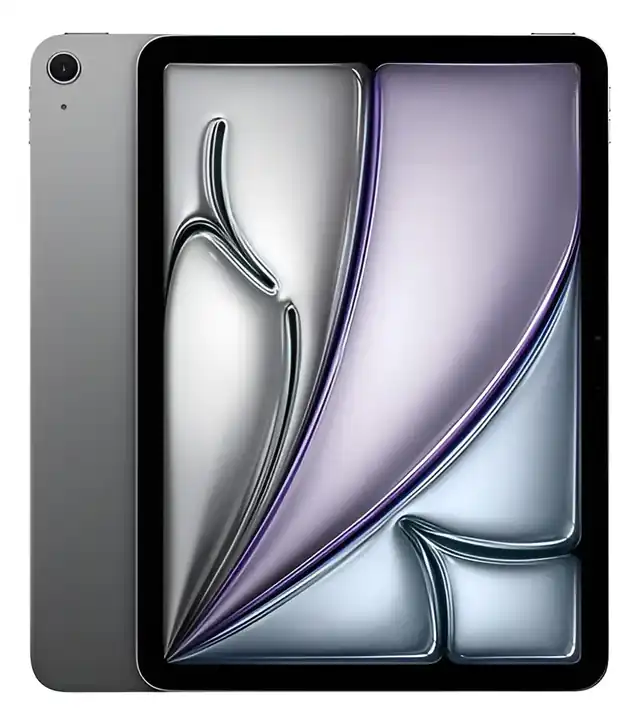
The Apple iPad Air 11 M3 Wi-Fi 128GB Space Gray is a strong choice if you want a light, fast and premium-feeling tablet without moving into the heavier professional iPad category. It makes the most sense for students, professionals, casual creators and Apple users who want performance, portability and accessory support in one device. It is less ideal if you need mobile data without a hotspot, a very large screen, massive local storage or the most advanced display Apple offers.
This Apple iPad Air 11 M3 review is for anyone trying to decide whether the Wi-Fi version with 128GB storage is enough for real daily use. On paper, it looks like a simple tablet. In practice, it sits in a very specific place: more capable than a basic iPad, more portable than many laptop setups and more restrained than a Pro model.
The key is not asking whether it is powerful. It clearly is. The better question is whether its size, storage, connectivity and accessory ecosystem match the way you actually study, work, draw, edit, read, watch and travel.
The 11-inch M3 iPad Air in everyday use
The Apple iPad Air 11 M3 Wi-Fi 128GB Space Gray is built around a familiar iPad idea: a thin tablet that can shift between entertainment, productivity and creative work without feeling complicated. The 11-inch format is the most practical part of the experience. It is large enough for split-screen work, documents, sketching and video, but still easy to carry in a backpack or use on a sofa.
The M3 chip gives this model a clear performance identity. It is not just for browsing, streaming and messaging. It has enough headroom for demanding apps, heavier multitasking, photo work, drawing apps, note-taking, video calls and games with more complex graphics.
The Space Gray finish also helps the device feel discreet and professional. It is the kind of color that fits office use, study setups and casual home use without drawing too much attention. For buyers who want a clean, neutral iPad, this version is one of the safest choices.
The Wi-Fi model is best understood as a home, office, school and hotspot-friendly tablet. It works very well when you are usually near a reliable wireless network. It is less convenient if you want the iPad to stay connected independently during travel, commuting or field work.
The storage and connectivity choice that deserves attention
The most common mistake with this iPad is focusing only on the M3 chip and ignoring the 128GB Wi-Fi configuration. Performance is not the concern here. The real decision is whether the base storage and Wi-Fi-only connection match your habits.
For many users, 128GB is enough. It works well if you rely on cloud storage, stream most of your movies and music, keep documents organized online and do not store large video libraries locally. Students, writers, readers, casual editors and office users can live comfortably with this capacity when they manage files with some discipline.
It becomes tighter if you download many large games, save long 4K videos, keep offline courses, store large design files or use professional creative apps with heavy project folders. In that case, the device can still perform well, but storage management becomes part of the routine.
The Wi-Fi-only configuration is another practical point. It can connect through home, office, school and public networks, and it can use a phone hotspot when needed. But it does not replace a cellular iPad for people who need independent connection everywhere.
This matters for buyers who travel often, work outdoors, attend events, visit clients or use the tablet as a navigation and document device away from stable networks. If constant connectivity is essential, the Wi-Fi version can frustrate you even though the tablet itself is excellent.
Where the M3 Air feels strongest
The strongest argument for this iPad Air is balance. It is powerful enough to feel fast today, light enough to carry easily and versatile enough to support several types of use without forcing you into a single workflow.
For study, it is especially practical. You can read PDFs, annotate documents, write notes, attend video classes, open reference material and use productivity apps comfortably. When paired with a compatible keyboard, it becomes much better for writing, email, spreadsheets and research.
For work, the iPadOS multitasking tools make it possible to handle several tasks at once. It is not the same as a full desktop operating system, but for many workflows it is efficient: messaging, presentations, documents, dashboards, cloud files, web apps and video meetings all feel natural.
For creativity, Apple Pencil support is a major advantage. The iPad Air works with Apple Pencil Pro and Apple Pencil USB-C, which makes it attractive for drawing, handwriting, photo retouching, design sketches and visual planning. The laminated display helps the writing and drawing experience feel more direct.
The 12MP landscape front camera is also important. Because the camera is placed for horizontal use, video calls feel more natural when the iPad is attached to a keyboard or standing on a desk. Center Stage helps keep the subject framed during calls, which is useful for classes, meetings and family conversations.
The M3 chip also gives the device a longer useful life for demanding apps. It is not only about speed on the first day. It is about having enough performance reserve for future iPadOS features, heavier apps and Apple Intelligence functions that benefit from modern Apple silicon.
Trade-offs to consider before choosing this model
The Apple iPad Air 11 M3 is not a perfect tablet for every buyer. Its strongest quality is balance, and that also means it avoids some features reserved for more advanced models.
The display is sharp, colorful and pleasant, but it is not the most advanced iPad display available. If you are used to high-refresh screens or want the deepest contrast for professional visual work, a more premium iPad can feel smoother and more impressive.
Touch ID is built into the top button, and it works well. Still, some users may prefer face-based unlocking, especially when the iPad is docked on a desk. This is not a major problem, but it is a detail worth noticing if you expect the most seamless unlocking experience.
The 11-inch size is portable, but it is not the best canvas for everyone. Artists, video editors, multitaskers and people who keep two apps open all day may prefer a larger screen. The compact format is excellent for mobility, but less generous for long creative sessions.
Accessories also shape the experience. The iPad becomes much more useful with a keyboard, protective case or Apple Pencil, depending on your workflow. Those accessories are not part of the core tablet experience for every listing, so the final setup depends on what you choose to add later.
Another point is laptop replacement. This iPad can replace a laptop for many light and medium tasks, but it does not behave exactly like a traditional computer. Some desktop software, file workflows and professional tools may still be easier on a Mac or Windows laptop.
What the M3 chip, display and cameras actually mean
The M3 chip is the center of this iPad Air. It combines an 8-core CPU, 9-core GPU, hardware-accelerated ray tracing, a 16-core Neural Engine and 8GB of RAM. In practical terms, that means smooth performance across multitasking, creative apps, games, productivity tools and Apple Intelligence features.
The 11-inch Liquid Retina display has a 2360 x 1640 resolution at 264 pixels per inch. It uses IPS technology, supports wide color, True Tone, an anti-reflective coating and 500 nits of brightness. That combination makes it comfortable for reading, browsing, drawing, streaming and editing photos in normal indoor conditions.
The tablet is thin and light enough to feel genuinely portable. With a 6.1 mm profile and a weight around 460 grams for the Wi-Fi model, it is easy to carry and comfortable to hold for reading or note-taking. This is one of the main reasons the 11-inch Air remains appealing.
Camera quality is also more useful than many people expect from a tablet. The rear 12MP wide camera can capture photos, scan documents and record 4K video. The front 12MP landscape Center Stage camera is better aligned with modern video calls, especially when the iPad is used horizontally.
Connectivity is strong for a Wi-Fi model. Wi-Fi 6E and Bluetooth 5.3 help with faster wireless performance when the network and accessories support it. The USB-C port supports charging, DisplayPort and USB 3 transfer speeds, which makes the device more flexible for external displays, storage accessories and creative workflows.
Battery life depends on what you do, but the iPad Air is designed for all-day-style use in common tasks such as browsing and watching video. Heavier gaming, video editing, high brightness and constant calls will drain it faster. For mixed use, it should comfortably cover many daily routines.
The box includes the iPad Air, a USB-C charging cable and a USB-C power adapter. That is useful for buyers who want a complete basic setup from the start, although protective and productivity accessories still need to be considered separately.
The buyer profile it fits best
This iPad is a very good fit for students who want one device for reading, note-taking, classes, research and entertainment. The 11-inch size is easy to carry, while the M3 chip gives enough power for demanding educational apps and multitasking.
It also fits professionals who need a lightweight secondary device. If you already use a laptop or desktop but want something easier for meetings, travel, presentations, email, notes and quick edits, the iPad Air can become a very efficient companion.
Casual creators are another strong match. People who draw, edit photos, mark up documents, create social content or write scripts can benefit from the screen, Pencil support and M3 performance without needing the full Pro experience.
It is also a good choice for families who want a premium shared tablet. It handles video, games, browsing, FaceTime, schoolwork and apps with ease. The main caution is storage: a shared family device can fill up quickly if everyone downloads games, videos and media.
Apple ecosystem users will get even more from it. If you already use an iPhone, Mac, AirPods or iCloud, the iPad Air becomes easier to integrate into your daily routine. Features like handoff, shared files, AirDrop and continuity make the experience feel connected.
Cases where another iPad is the smarter move
Another iPad may make more sense if your use is very basic. If you mainly browse the web, watch videos, read news, check email and use simple apps, the standard iPad line may already be enough. The Air gives you more performance and accessory flexibility, but not everyone needs that extra headroom.
A larger iPad may be better if your priority is screen space. Artists, designers, video editors, spreadsheet users and people who spend hours with split-screen apps may prefer a 13-inch model. The 11-inch version is easier to carry, but the larger size is more comfortable for extended work.
A cellular configuration is the better choice if you need connection away from Wi-Fi without relying on a phone hotspot. This matters for frequent travelers, field workers, students with unreliable campus networks and professionals who use the iPad in transit.
A higher-end iPad can also be the better fit for users who demand the most advanced display, the smoothest visual experience and the strongest creative configuration. The Air is powerful, but it is still positioned as a balanced model, not the most premium tablet Apple makes.
A newer Air generation may also be worth considering if having the latest chip and wireless platform matters more than choosing the M3 configuration. The M3 remains very capable, but buyers who always want the newest iPad Air should compare generations carefully before deciding.
How it sits between basic iPads, Pro tablets and newer Air options
Compared with a basic iPad, the Apple iPad Air 11 M3 feels more performance-focused and more future-ready. The M3 chip, accessory compatibility and better creative flexibility make it a stronger choice for users who want to do more than simple media consumption.
Compared with an iPad Pro, the Air is more restrained. It does not chase every premium display and workflow feature. Instead, it offers a more balanced experience for people who want speed and quality without necessarily needing the most advanced professional tablet.
Compared with larger tablets, the 11-inch Air wins on portability. It is easier to hold, easier to pack and easier to use casually. The trade-off is workspace. If your iPad will often sit on a desk with a keyboard and multiple apps open, a larger display can feel more comfortable.
Compared with newer Air options, the M3 model should be judged by practical needs rather than generation names alone. If your apps, storage habits and connectivity needs are covered, the M3 Air still delivers strong performance. If you specifically want the latest processor, the newest wireless features or maximum longevity from a new purchase, newer models deserve a look.
This is why the M3 Air is best seen as a premium middle path. It is not the cheapest iPad, not the most extreme iPad and not the largest iPad. Its appeal is the way it combines speed, screen quality, portability and accessory support in a form that works for many people.
A clear decision for buyers who want power without excess
The Apple iPad Air 11 M3 Wi-Fi 128GB Space Gray is a smart pick if you want a fast, refined and portable iPad for several years of study, productivity, creativity and entertainment. It gives you enough performance to feel confident with demanding apps, while keeping the size manageable for everyday use.
The main reasons to choose it are the M3 chip, the quality 11-inch Liquid Retina display, Apple Pencil compatibility, strong video call setup, USB-C flexibility and lightweight design. These features make it feel much more capable than a simple media tablet.
The reasons to pause are just as clear. The Wi-Fi-only configuration is not ideal for constant travel without a hotspot. The 128GB storage can become restrictive for heavy local files. The display is excellent for most users, but not the most advanced option in Apple’s tablet lineup.
If your routine is built around portability, cloud storage, reliable Wi-Fi and a mix of work and entertainment, this model makes excellent sense. If you need a bigger screen, independent mobile data, very large storage or professional display features, another configuration will serve you better.
Is the Apple iPad Air 11 M3 good for students?
Yes, it is a strong student tablet because it combines portability, performance and accessory support. It works well for reading, research, note-taking, video classes, presentations and document editing. The 11-inch size is easy to carry, and the M3 chip gives enough power for demanding school apps without making the device feel oversized.
Can the iPad Air 11 M3 replace a laptop?
Yes, it can replace a laptop for many daily tasks, but not for every workflow. It handles writing, email, browsing, calls, presentations, notes and cloud apps very well, especially with a keyboard. It is less ideal if you depend on desktop-only software, complex file management or professional tools built around a traditional computer interface.
Is 128GB enough on the iPad Air M3?
Yes, 128GB is enough for many users who stream media, use cloud storage and keep files organized. It is a practical capacity for study, work, browsing, notes and moderate app use. It can feel limited if you store many large games, offline videos, creative projects, 4K recordings or heavy design files directly on the iPad.
Does the Wi-Fi model work well without cellular data?
Yes, it works very well when you usually have access to reliable Wi-Fi or can use a phone hotspot. The Wi-Fi version is ideal for home, office, school and travel situations with wireless access. It is less convenient for people who need independent internet connection everywhere without relying on another device.
Is this iPad Air good for drawing and handwritten notes?
Yes, it is a very good option for drawing and handwritten notes because it supports Apple Pencil Pro and Apple Pencil USB-C. The laminated Liquid Retina display helps writing and sketching feel direct and responsive. Artists who need a larger canvas may prefer a bigger iPad, but the 11-inch model is excellent for portability.
Is the display good for movies, reading and photo work?
Yes, the Liquid Retina display is sharp, bright and comfortable for everyday visual use. It is strong for movies, reading, browsing, photo viewing and light editing. The wide color support, True Tone and anti-reflective coating improve the experience. Users who want the most advanced contrast and smoothness should compare it with Apple’s higher-end tablets.
How does it compare with a regular iPad?
The iPad Air 11 M3 is more powerful and more flexible than a regular iPad. It makes more sense if you want stronger multitasking, better creative potential, longer performance headroom and higher-end accessory support. A regular iPad can still be enough for simple browsing, streaming and casual apps, especially for lighter users.
Should I choose the M3 Air or a newer Air or Pro model?
Choose the M3 Air if you want a powerful, portable and balanced iPad for work, study and creativity without chasing every premium feature. Consider a newer Air if having the latest generation matters most. Consider a Pro model if you need the most advanced display experience, heavier creative workflows or the strongest professional configuration.
The Apple iPad Air 11 M3 Wi-Fi 128GB Space Gray is one of the most sensible iPad choices for users who want speed, portability and premium usability in the same device. It is powerful enough for serious daily work, light enough for constant movement and flexible enough to serve as a study tool, creative canvas, entertainment screen and productivity companion.
The best buyer is someone who wants more than a basic tablet but does not need the most advanced iPad available. If you are comfortable with Wi-Fi, can manage 128GB storage and value the compact 11-inch size, this model delivers a very strong balance. If your needs point toward cellular data, larger storage, a bigger display or Pro-level screen technology, choose another configuration before committing.