A practical look at Apple’s compact all-in-one desktop for buyers who want high memory, generous storage, a sharp display, and a cleaner workspace without building a separate setup.
The iMac M4 24-inch with 32GB RAM and 1TB SSD makes the most sense for users who want a premium all-in-one Mac for productivity, creative work, study, business use, video calls, and a visually organized desk. It is not the strongest choice for users who need maximum upgrade flexibility, heavy professional rendering, a larger built-in screen, or a portable computer.
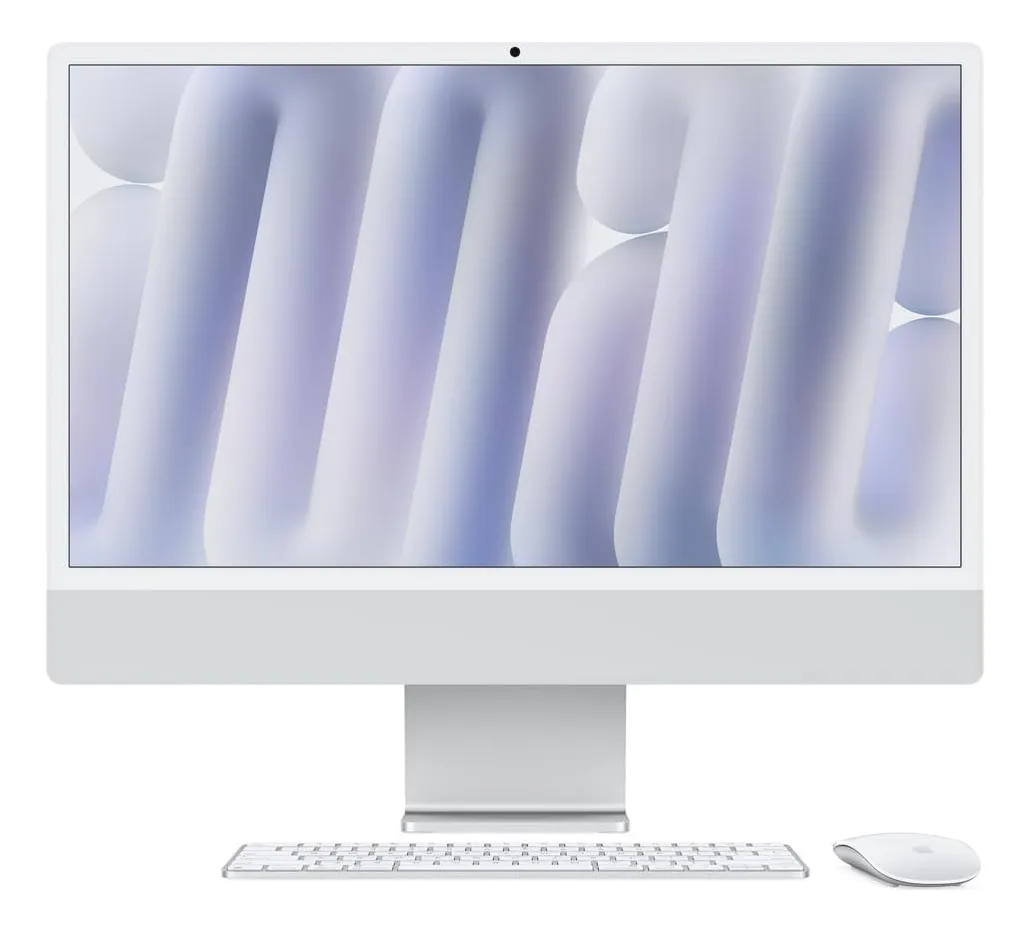
The iMac M4 24-inch 32GB RAM 1TB SSD is a desktop made for people who want performance and simplicity in the same machine. Instead of pairing a computer, monitor, camera, speakers, keyboard, mouse, and cables separately, it puts the core experience into one thin, polished display.
This configuration is especially interesting because it avoids the most common weak point in entry-level computers: limited memory and storage. With 32GB of unified memory and a 1TB SSD, it targets buyers who want the iMac’s clean design but do not want to feel constrained too quickly.
What this iMac M4 configuration is trying to solve
The 24-inch iMac has always been about convenience, visual appeal, and an uncluttered setup. The M4 generation keeps that identity but adds a more modern performance base, making the machine more credible for demanding daily use than older entry-level desktops.
The appeal is simple: you get a Mac, a 4.5K Retina display, built-in speakers, camera, microphones, wireless accessories, and a compact footprint in a single product. For home offices, reception desks, study rooms, consulting spaces, and small creative studios, that matters as much as raw speed.
The M4 chip is the center of the experience. It is designed to handle everyday tasks with speed, but it also gives the iMac enough power for photo editing, design work, office workflows, light to moderate video editing, multitasking, and AI-assisted features inside the Apple ecosystem.
The 32GB memory option is the part that changes the buying decision. Many people can live with less memory for casual browsing and office work, but 32GB gives more breathing room when multiple apps, browser tabs, large files, design tools, communication apps, and background processes are open at the same time.
The 1TB SSD also fits a more serious usage profile. It gives more room for documents, photos, project files, apps, offline media, business material, and active creative work before the user needs to depend heavily on external drives or cloud storage.
The screen size is the decision that deserves the most attention
The biggest buying mistake with this iMac is assuming that a premium desktop automatically means a large desktop. The display is sharp, bright, and color-rich, but it remains a 24-inch class screen. That is excellent for many desks, but not ideal for everyone.
For writing, browsing, spreadsheets, presentations, video calls, online classes, business management, design drafts, and general productivity, the size feels balanced. It is large enough to be comfortable and small enough to fit cleanly in bedrooms, offices, shops, studios, and compact workstations.
For users coming from a laptop, the jump feels substantial. The workspace is more comfortable, the display is much sharper than many conventional monitors, and the all-in-one design reduces visual mess on the desk.
For users already accustomed to larger monitors, ultrawide displays, or dual-screen setups, the 24-inch format can feel restrictive. This is especially true for video editors with complex timelines, financial users working with large dashboards, developers who keep many panels open, or designers who prefer a wide canvas.
The display quality is a major strength, but the size should match the way you work. This iMac is not just a processor purchase; it is also a workspace purchase. If the screen area is enough for your routine, the machine feels elegant and efficient. If you need more room, a Mac mini or Mac Studio with a separate monitor may be more flexible.
Where the 32GB memory and 1TB SSD make a real difference
The 32GB RAM configuration gives this iMac a more durable profile for multitasking. It is not only about running one heavy app. It is about keeping several workflows open without constantly thinking about memory pressure.
This matters for people who work with many browser tabs, cloud platforms, office apps, messaging tools, image editors, presentations, spreadsheets, and video meetings throughout the day. It also helps users who want the Mac to remain comfortable for several years instead of feeling like a basic configuration too soon.
For creative users, the extra memory can help with photo libraries, layered design files, audio sessions, content creation, and moderate video editing. It does not turn the iMac into a workstation for every professional scenario, but it does make the all-in-one format much more capable.
The 1TB SSD improves the experience in another way. Many modern workflows create large files quickly: high-resolution photos, screen recordings, short-form videos, project exports, local backups, app libraries, and cached data. More internal storage means fewer compromises in the first months of use.
It also keeps the desk cleaner. One of the reasons to choose an iMac is to avoid external clutter. If the internal SSD is too small, external drives become part of the daily setup. With 1TB, many users can keep the minimalist experience for longer.
This configuration is therefore best understood as the more comfortable version of the iMac M4 for serious daily use. It is not only faster on paper; it is better aligned with how people actually use a desktop over time.
Performance for work, creativity, study, and everyday use
The M4 chip gives the iMac a fast and responsive feel in normal use. Apps open quickly, multitasking feels fluid, and the system is well suited for users who want a desktop that feels modern without needing a complicated setup.
For office work, the experience should be more than enough. Documents, spreadsheets, browser-based platforms, email, video calls, file management, presentations, and online tools are all well within the profile of this machine.
For students and remote workers, the all-in-one design is one of the strongest arguments. It creates a dedicated workstation with a strong display, a good camera, clean audio, and enough performance for research, calls, writing, editing, and learning platforms.
For content creators, the answer depends on the workload. The iMac M4 with 32GB memory and 1TB storage is attractive for photography, design, social media production, light video editing, short projects, and visual work that benefits from a color-rich display.
For heavier professional production, expectations should be realistic. Long timelines, intensive 3D work, advanced motion graphics, large multi-camera projects, and sustained rendering may be better suited to higher-end Mac configurations with stronger thermal headroom and more graphics power.
This iMac is fast, polished, and efficient, but it is still designed as a compact all-in-one desktop. It favors balance over maximum expandability. That balance is exactly why it works so well for many users, and also why some professionals should compare it carefully before buying.
The display, camera, sound, and desk experience
The 24-inch 4.5K Retina display is one of the main reasons to choose the iMac instead of assembling a separate desktop. It offers very high sharpness, strong brightness, wide color support, and a clean visual experience for text, photos, video, and interface work.
Text looks crisp, which is important for anyone who spends long hours reading, writing, editing documents, managing business tools, or studying. Images and video also look rich, making the machine pleasant for both work and entertainment.
The built-in camera is another practical advantage. For remote meetings, online classes, consultations, team calls, and family video chats, having a capable camera integrated into the display keeps the setup simple. There is no need to mount a separate webcam unless you have very specific production needs.
The audio system also supports the all-in-one proposal. Built-in speakers are useful for calls, video lessons, casual music, presentations, and everyday media. Users who produce audio professionally may still want dedicated monitors or headphones, but many buyers will appreciate not needing external speakers immediately.
The design matters more than some spec sheets suggest. A desktop is something you see every day. The iMac’s thin profile, color options, compact stand, and minimal cabling can make a workspace feel more organized and intentional.
That is not a superficial detail for every buyer. In customer-facing environments, home offices, studios, clinics, shops, and reception areas, the computer also becomes part of the room. The iMac is one of the few desktops where appearance is clearly part of the product’s practical value.
What may frustrate some buyers after the first week
The first point to understand is that this is not a modular desktop in the traditional sense. You are choosing a complete integrated system, not a separate tower or mini computer that can easily change display, camera, speakers, or internal configuration later.
That is great for simplicity, but less ideal for users who like to upgrade parts over time. Memory and storage should be chosen carefully at purchase because they are not meant to be treated like conventional user-upgradeable desktop components.
The 24-inch display can also be a deal breaker for some workflows. It is sharp and beautiful, but screen area is not the same thing as resolution quality. Users who need multiple large windows visible at once may still prefer a bigger monitor or a dual-display setup.
Port selection should also be checked carefully before buying. The more capable configurations generally make more sense for users with external accessories, but anyone using several drives, hubs, displays, audio devices, card readers, or professional tools should think through the full setup.
Gaming is another area where expectations should stay balanced. The M4 chip can handle many games and Apple Silicon continues to improve as a platform, but the iMac is not primarily a gaming desktop. Buyers focused mainly on games should evaluate software compatibility and performance expectations before choosing it.
The color choice also deserves attention. The iMac is available in several colors depending on configuration and availability, but the selected color should be confirmed before purchase. This is not a minor detail, because the color is part of the device’s long-term visual presence on the desk.
Technical profile that matters in daily use
This iMac configuration combines the Apple M4 generation with 32GB of unified memory and a 1TB SSD. In practical terms, that means the processor, graphics system, and memory architecture are designed to work efficiently together, which helps the Mac feel responsive across everyday and creative tasks.
The 24-inch class Retina display has a 4.5K resolution, high pixel density, wide color support, True Tone technology, and strong brightness for typical indoor environments. This makes it suitable for users who care about sharp text, polished visuals, and accurate-looking images.
The M4 platform also includes a Neural Engine for machine learning and AI-related tasks. This helps keep the machine aligned with newer Apple software features and workflows that rely increasingly on on-device intelligence.
For connectivity, the specific port arrangement depends on the chosen model configuration. Buyers should pay attention to the number of USB-C and Thunderbolt ports, accessory compatibility, external display needs, and whether their existing peripherals require adapters.
The 1TB internal SSD is a strong match for people who want fewer external accessories. It gives enough internal space for a more comfortable workflow, especially when compared with smaller storage configurations that can fill quickly with creative files and app data.
The 32GB memory option is the safer choice for heavier multitasking and longer-term use. It is especially relevant if the computer will be shared by a family, used in a business, or expected to handle work and creative apps for several years.
A strong fit for clean desks, serious multitasking, and Apple users
This iMac makes the most sense for users who want a refined desktop experience with minimal friction. It is ideal for someone who wants to open the computer, sit down, and work without thinking about monitor selection, speaker quality, webcam setup, or cable management.
It also suits people already invested in the Apple ecosystem. If you use an iPhone, iPad, AirPods, iCloud, Apple apps, or other Macs, the iMac fits naturally into that environment. Continuity features and ecosystem integration can make daily tasks smoother.
Small business owners can also benefit from this configuration. It works well for administration, customer communication, content updates, spreadsheets, design assets, video meetings, and store or office management, while keeping the workspace visually professional.
Creative freelancers with moderate workloads may find it especially appealing. Designers, photographers, educators, consultants, writers, and social media creators can get a strong balance of screen quality, performance, storage, and simplicity.
Families can also use it as a central home computer. It is powerful enough for school, work, calls, media, organization, documents, and creative hobbies, while the all-in-one form keeps the setup friendly and tidy.
The key phrase is balanced permanence. This iMac is not bought for portability or extreme customization. It is bought because it creates a stable, attractive, capable desktop station that feels ready every time you sit down.
Cases where another Mac may be the smarter direction
This model is not the best match for people who need mobility. If the computer must travel between work, home, university, meetings, and trips, a MacBook Air or MacBook Pro will make more sense.
It may also be less ideal for users who already own a high-quality monitor. In that case, a Mac mini can deliver a more flexible desktop path because it lets you choose the display size, keyboard, mouse, camera, speakers, and future monitor upgrades separately.
Professionals who need the strongest sustained performance should also compare carefully. For advanced video editing, heavy coding environments, large production files, 3D rendering, or specialized workloads, a more powerful Mac may be a better long-term fit.
Users who need a very large display should not ignore that requirement. A larger external monitor can change productivity dramatically. If your work depends on wide timelines, multiple documents, large dashboards, or side-by-side windows, screen area may matter more than the elegance of the all-in-one format.
The iMac also makes less sense for people who enjoy upgrading their desk setup piece by piece. Its strength is integration. If you prefer changing monitors, testing different keyboards, upgrading cameras, or building a workstation over time, a modular Mac setup is more aligned with that style.
How it compares with other Apple desktop and laptop choices
Compared with a Mac mini setup, the iMac is simpler and more visually complete. You do not need to choose a separate monitor, speakers, camera, keyboard, and mouse. The trade-off is that the Mac mini gives more freedom to build the exact desk you want.
Compared with a MacBook Air, the iMac offers a more comfortable fixed workstation with a larger built-in display and better desk presence. The MacBook Air wins for portability, but the iMac wins when the priority is sitting at a dedicated desk for long sessions.
Compared with a MacBook Pro, the answer depends on the workload. A MacBook Pro can be the better option for users who need both strong performance and mobility. The iMac is better for users who want a permanent desktop with a clean all-in-one experience.
Compared with older iMac models, the M4 generation is more attractive for buyers who want a current Apple Silicon platform, stronger AI readiness, better long-term software relevance, and a more modern performance profile.
Compared with smaller memory or storage configurations, this 32GB RAM and 1TB SSD version is the more comfortable choice for demanding daily use. It gives more room for multitasking, local files, creative apps, and longer-term ownership.
The best alternative is not the same for every buyer. If convenience and design matter most, the iMac is compelling. If flexibility matters most, a separate Mac and monitor may be smarter. If mobility matters most, a MacBook remains the natural answer.
The buying decision in plain terms
The iMac M4 24-inch 32GB RAM 1TB SSD is worth considering if you want a desktop that feels fast, organized, visually premium, and ready for serious everyday work. Its biggest strengths are the all-in-one format, strong display, modern M4 performance, generous memory, and practical internal storage.
It is especially persuasive for people who dislike complicated setups. A single machine can handle work, calls, study, creative tasks, media, and family use while keeping the desk clean.
The main caution is not performance for normal use. The main caution is fit. You need to be comfortable with the 24-inch screen size, the integrated design, and the reduced flexibility compared with a modular desktop setup.
If those trade-offs feel acceptable, this configuration is one of the more sensible iMac M4 choices because it avoids the compromises of lower memory and smaller storage. It is the version to consider when you want the iMac experience without making it feel too basic.
Is the iMac M4 24-inch 32GB RAM 1TB SSD good for professional work?
Yes, it is a strong option for many professional routines such as office work, consulting, design, photography, writing, online meetings, business management, and moderate content creation. It is less suitable for users who need extreme sustained performance, advanced 3D production, or very large video projects.
Is 32GB RAM necessary on the iMac M4?
Yes, it makes sense if you multitask heavily or want a more durable configuration. Users with many browser tabs, creative apps, office tools, calls, and background services will benefit from the extra memory. Casual users may not need it, but it gives more comfort over time.
Is 1TB SSD enough for this iMac?
Yes, 1TB is a comfortable internal storage choice for most users. It works well for documents, apps, photos, project files, media, and business use. Very heavy video editors, photographers with huge libraries, and users with large archives may still need external storage.
Can the iMac M4 replace a MacBook?
Yes, it can replace a MacBook if you mainly work from one fixed place. It gives a more comfortable desktop experience and a larger built-in display. It is not a replacement for users who need portability, travel use, or frequent work away from a desk.
Is the 24-inch display large enough?
Yes, it is large enough for many users coming from laptops or compact desks. It is excellent for writing, browsing, calls, documents, and creative work. It may feel small for users who depend on large dashboards, wide timelines, dual monitors, or many windows open together.
Is the iMac M4 good for photo and video editing?
Yes, it is good for photo editing and light to moderate video work, especially with 32GB RAM and 1TB storage. The Retina display helps visual work feel precise and comfortable. Heavy production workflows may require a more powerful Mac or a more flexible monitor setup.
Should I choose this iMac instead of a Mac mini?
Yes, choose the iMac if you want a complete, elegant, all-in-one setup with minimal cables and no monitor selection process. Choose a Mac mini if you want more flexibility, a larger screen, easier accessory choices, or a desktop system you can reshape over time.
Does the color choice matter on the iMac?
Yes, the color matters because the iMac is part of the workspace visually. Unlike a hidden desktop box, it stays in front of you every day. The right color can match a home office, studio, reception area, or personal desk more naturally.
The iMac M4 24-inch 32GB RAM 1TB SSD is best understood as a premium all-in-one Mac for people who want a clean desktop, strong everyday performance, a beautiful display, and fewer setup decisions. It is not the most flexible Mac, but that is also part of its appeal.
Choose it if you want a stable, elegant workstation for productivity, creative tasks, communication, study, and business use. Skip it if you need portability, a much larger screen, maximum upgrade flexibility, or workstation-level performance for the heaviest professional workloads.