A practical look at the ASUS Vivobook 15 with Intel Core i5, Full HD display, SSD storage and Linux KeepOS for users who need a reliable everyday notebook.
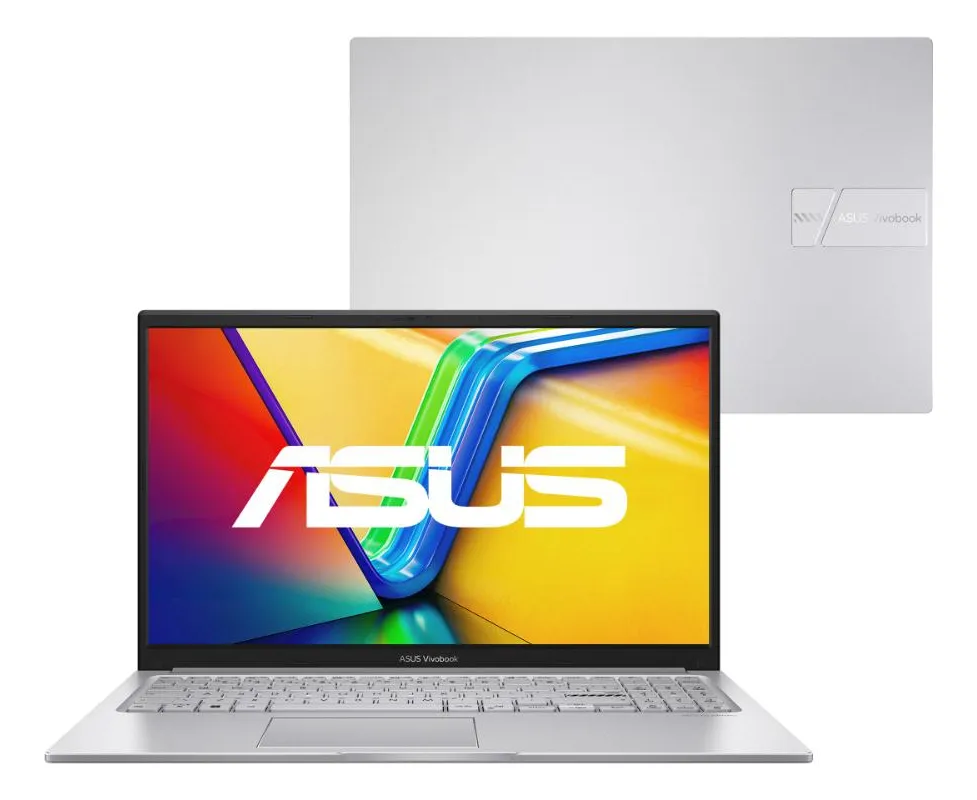
The ASUS Vivobook 15 X1504VA-NJ1739 is worth considering if you want a simple, modern and productivity-focused notebook for studying, office work, web browsing, online classes and everyday multitasking. Its strongest appeal is the combination of a 13th generation Intel Core i5 processor, Full HD anti-glare screen, SSD storage, privacy webcam cover and a lightweight 15.6-inch design. It is not the best choice for heavy gaming, advanced video editing or users who need a large internal storage space from day one.
The ASUS Vivobook 15 X1504VA-NJ1739 review starts with a very common question: does this notebook make sense for a normal user who wants speed, comfort and practicality without moving into a high-performance workstation?
For most daily routines, the answer is positive. This model is clearly positioned as an everyday laptop for productivity, study and home use, with enough power for common tasks and a few important points to check before buying.
A 15.6-inch notebook built for daily productivity
The ASUS Vivobook 15 X1504VA-NJ1739 is a 15.6-inch notebook aimed at people who want a larger screen, a familiar laptop format and a configuration that handles everyday work with more confidence than entry-level machines.
Its main hardware base includes an Intel Core i5-1334U processor, 8 GB of RAM, 256 GB SSD storage and integrated Intel Iris Xe graphics. That combination places it in a practical middle ground for documents, spreadsheets, browser tabs, video calls, streaming, online tools and light creative tasks.
The Full HD display is one of the most relevant points for daily use. A 1920 x 1080 resolution gives more workspace than basic HD screens, which helps when reading text, working with documents side by side or watching content with better sharpness.
The anti-glare finish also matters. It does not make the screen perfect in every lighting condition, but it helps reduce reflections in classrooms, offices, bedrooms and shared workspaces.
The notebook comes with KeepOS, a Linux-based operating system. This can be positive for users who are comfortable with Linux or who mainly use browser-based tools. It may require adaptation for people used to Windows programs, especially if they depend on specific software that does not run natively on Linux.
The operating system is the first point to check carefully
The detail that most easily causes a wrong purchase decision in this model is not the processor, screen size or design. It is the operating system.
Because the ASUS Vivobook 15 X1504VA-NJ1739 comes with KeepOS Linux, it is important to understand how you will use the notebook before deciding. If your routine is based on web browsing, online classes, cloud documents, email, video meetings, streaming and basic file management, the system can be enough.
If you need specific Windows-only programs, the experience may not be as direct. Some users may choose to install another operating system later, but that requires technical knowledge, license considerations and driver care.
This does not make the product weak. It simply changes the ideal buyer profile. It makes more sense for someone who wants a functional notebook and is comfortable with Linux, or for someone who already plans to configure the system according to personal needs.
Before buying, the safest approach is to list your essential programs. If they run in the browser or have Linux versions, the notebook becomes much easier to recommend. If they are locked to Windows, this point deserves attention.
Where the Vivobook 15 feels useful in real life
The strongest practical advantage of this ASUS Vivobook 15 is its balance for everyday tasks. The Intel Core i5-1334U is a modern efficiency-focused processor designed for thin and light notebooks, and it offers enough headroom for the kind of multitasking most users perform daily.
Opening several browser tabs, editing documents, using spreadsheets, attending online meetings and watching videos should fit well within the proposal of the machine. The SSD also helps the system feel more responsive when opening apps, starting the notebook and moving between files.
The 15.6-inch screen makes the experience more comfortable than compact laptops for users who spend many hours reading, typing or studying. It is a good size for people who value visibility and do not want to rely on an external monitor all the time.
The webcam privacy cover is another practical point. It gives physical control over the camera, which is useful for students, remote workers and anyone who uses video calls frequently.
The design in Cool Silver also helps the notebook feel more neutral and professional. It does not look like a gaming machine, and that can be an advantage for work, university and business environments.
- Good fit for office work, study and online classes.
- Full HD display suitable for reading and media consumption.
- SSD storage for faster everyday responsiveness.
- Physical webcam cover for extra privacy.
- Integrated graphics for basic visual tasks and light media use.
Where expectations need to stay realistic
The ASUS Vivobook 15 X1504VA-NJ1739 is not designed to replace a gaming laptop, a professional editing workstation or a high-end ultrabook. Its configuration is practical, but it has natural limits.
The 8 GB of RAM is enough for many everyday tasks, but users who keep many heavy apps open at the same time may eventually feel constrained. Browser-heavy routines can consume memory quickly, especially with multiple tabs, video meetings and productivity platforms running together.
The 256 GB SSD is another point that depends on profile. It is fine for documents, study files, basic apps and cloud-based use, but it may feel limited for users who store many videos, large photo libraries, offline projects or heavy software packages.
The integrated Intel Iris Xe graphics are useful for general visual performance, video playback and light creative work. They are not aimed at demanding games, professional 3D work or GPU-intensive editing.
The screen is Full HD and anti-glare, which is good for the category, but it should not be treated as a professional color display for designers, photographers or video color work. For that type of use, a more specialized panel would be more appropriate.
Performance, display, storage and connectivity in daily use
The Intel Core i5-1334U is the center of the experience. It is a 13th generation Intel processor with a hybrid architecture designed to balance performance and efficiency. In practice, that means the notebook is better suited to productivity speed than to sustained heavy workloads.
For school, university, office documents, research, video meetings and browser-based platforms, the processor is a strong point. It gives the machine a more comfortable margin than basic entry-level processors.
The 8 GB RAM configuration is split between onboard memory and an additional module. This setup supports dual-channel operation, which can help general responsiveness and integrated graphics behavior. Still, heavy multitasking users should think carefully about memory needs.
The 256 GB NVMe SSD is important because it affects the feeling of speed. A notebook with SSD storage usually feels more responsive than older hard-drive-based machines, especially when turning on, opening programs and switching between everyday tasks.
The 15.6-inch Full HD display has a standard 16:9 format, anti-glare finish and refresh rate suitable for normal notebook use. It is a practical panel for studying, reading, writing, watching videos and working with spreadsheets.
Connectivity is also broad enough for common accessories. The notebook includes USB Type-A, USB Type-C, HDMI, audio connection and wireless connectivity with Wi-Fi and Bluetooth. That makes it easier to connect a mouse, external keyboard, monitor, headset or projector when needed.
The physical format is also worth noting. At around the typical weight for this class, it remains portable enough for home, school and office movement, while still offering a larger screen than smaller productivity laptops.
The buyer who will get the most from this ASUS notebook
This Vivobook 15 makes more sense for people who want a notebook for daily work and study, not for specialized performance. It is a strong candidate for students, remote workers, teachers, administrative professionals and home users who need a dependable machine for routine tasks.
It also fits users who spend most of their time inside a browser. If your work happens through email, online documents, learning platforms, dashboards, research pages, messaging apps and video meetings, the configuration is aligned with that reality.
The larger screen is useful for anyone who dislikes cramped displays. It helps with reading, writing, editing documents and following classes or meetings with more comfort.
It may also appeal to users who prefer a clean and simple design. The Cool Silver finish makes the machine discreet, and the webcam cover adds a small but important privacy feature.
This is a good choice if you want practical performance, a comfortable screen and a notebook that feels modern enough for common tasks without aiming at premium or professional workstation territory.
The profiles that should look at other options
This notebook is not the best match for users who need heavy graphics performance. If you want to play demanding games, render 3D scenes, edit complex video projects or work with professional visual production, a machine with dedicated graphics and more memory will make more sense.
It may also frustrate users who need a large local storage space. The SSD is fast, but the capacity is more appropriate for light to moderate file storage. People with many offline videos, large projects or extensive media libraries should consider a model with more internal storage or plan external storage from the beginning.
Users who need Windows from the first minute should also pay attention. KeepOS can work well for many tasks, but it is not the same as buying a notebook already configured with Windows.
Anyone expecting a premium display for color-sensitive design work should be cautious. The screen is practical for everyday use, but professional image editing requires more demanding display characteristics.
If portability is the top priority, a smaller and lighter notebook may be more comfortable. The 15.6-inch format is excellent for visibility, but not always ideal for people who carry the laptop for long hours every day.
How it compares with alternatives in the same category
Compared with basic entry-level notebooks, the ASUS Vivobook 15 X1504VA-NJ1739 has a more convincing processor and a stronger productivity profile. The Intel Core i5 gives it more breathing room for multitasking than simpler configurations designed only for very light use.
Compared with notebooks that offer larger SSDs or more RAM, this model may feel more conservative. Its advantage is balance, not maximum capacity. Users who know they need heavier multitasking or more local storage should compare configurations carefully.
Compared with compact laptops, the Vivobook 15 offers better visual comfort because of the larger display. The trade-off is portability. It is still a portable notebook, but not as compact as smaller models built mainly for travel.
Compared with gaming notebooks, the difference is very clear. This ASUS is quieter in proposal, more discreet in design and more focused on productivity. It is not aimed at high-performance graphics workloads.
Compared with premium ultrabooks, it is more practical than luxurious. The value is in the everyday configuration, useful ports, Full HD screen, SSD and privacy details rather than ultra-thin construction or high-end materials.
A practical decision for work, study and home routines
The ASUS Vivobook 15 X1504VA-NJ1739 is a solid everyday notebook when the buyer understands its role. It is made for productivity, learning, browsing, video calls, media consumption and general personal use.
Its best qualities are the modern Intel Core i5 processor, Full HD anti-glare screen, SSD responsiveness, practical connectivity and privacy-focused webcam cover. These are features that matter in real routines, not only on a specification sheet.
The main attention points are also clear. KeepOS requires compatibility awareness, the storage capacity is moderate, and the integrated graphics are not meant for heavy visual workloads.
For a user who wants a reliable 15.6-inch notebook for everyday life, this model makes sense. For someone who needs gaming power, professional editing performance or a Windows-ready experience without adjustments, another configuration will be safer.
Is the ASUS Vivobook 15 X1504VA-NJ1739 good for studying?
Yes, it is a good option for studying if your routine includes online classes, research, documents, presentations, PDFs and video calls. The Full HD screen helps with reading and multitasking, while the Intel Core i5 processor gives enough performance for common academic tasks. The main point is checking whether your required software works well with KeepOS Linux.
Does this ASUS Vivobook 15 work well for office tasks?
Yes, it works well for office tasks such as writing documents, using spreadsheets, browsing, email, online meetings and cloud platforms. The SSD helps the notebook feel responsive, and the 15.6-inch screen gives more visual space. It is best for general productivity, not for heavy professional workloads that require advanced graphics or very large memory capacity.
Is KeepOS Linux a problem on this notebook?
No, KeepOS Linux is not a problem if your main tools are browser-based or compatible with Linux. It can be enough for study, browsing, documents and media consumption. The concern appears when the user depends on Windows-only programs. In that case, it is important to check compatibility before choosing this version.
Can the ASUS Vivobook 15 X1504VA-NJ1739 run games?
Yes, it can handle simple and light games, but it is not designed for demanding gaming. The Intel Iris Xe integrated graphics are suitable for basic visual tasks and casual use, not for heavy titles with high graphics settings. Anyone buying mainly for games should look for a notebook with dedicated graphics.
Is 8 GB of RAM enough for this Vivobook 15?
Yes, 8 GB of RAM is enough for many daily routines, including browsing, documents, online classes and office work. However, users who keep many apps and browser tabs open at the same time may want more memory. For heavier multitasking, this configuration can become a point to evaluate carefully.
Is the 256 GB SSD enough for everyday use?
Yes, the 256 GB SSD can be enough for users who store documents, study files and basic applications, especially when using cloud storage. It may feel limited for people who save many videos, large image collections or heavy project files. The advantage is speed; the caution is local capacity.
Is the screen good for long hours of use?
Yes, the Full HD anti-glare screen is a positive point for long study or work sessions. It offers better sharpness than basic HD panels and helps reduce reflections. Still, it should be seen as a practical everyday display, not a specialized screen for professional color-sensitive design work.
Who should buy the ASUS Vivobook 15 X1504VA-NJ1739?
This notebook is best for students, remote workers, home users and professionals who need a reliable laptop for everyday productivity. It fits people who value a larger screen, SSD speed, a modern Intel Core i5 processor and practical connectivity. It is less suitable for gaming, advanced editing and users who require Windows-specific software from the start.
The ASUS Vivobook 15 X1504VA-NJ1739 is a well-positioned notebook for users who want practicality, a comfortable screen and dependable performance for common tasks. It does not try to be a gaming laptop or a professional workstation, and that is exactly why the buying decision should be based on realistic use.
Choose it if your priority is studying, working, browsing, attending meetings and using online tools with a modern productivity configuration. Look elsewhere if you need heavy graphics, much larger storage, advanced creative performance or a system environment that is already aligned with specific Windows-only software.