A practical look at the ASUS ExpertBook B1 with Intel Core i5-13420H, Windows 11 Pro, Full HD display, 8GB RAM and 256GB SSD for work, study and everyday productivity.
The ASUS ExpertBook B1 B1503CVA is worth considering if you want a work-oriented laptop for documents, spreadsheets, browser use, video calls, online systems and routine multitasking. Its strongest appeal is the combination of a business-focused proposal, Windows 11 Pro and a capable Intel Core i5 processor. It makes less sense if you need a machine for heavy creative work, gaming or large storage demands right out of the box.
This ASUS ExpertBook B1 B1503CVA review is for anyone trying to decide whether this notebook fits a serious daily-use routine. It is not positioned as a flashy entertainment laptop, but as a practical business notebook for users who prioritize productivity, operating system compatibility and a more professional setup.
The main buying question is simple: does the Intel Core i5-13420H, 8GB RAM and 256GB SSD configuration offer enough balance for real work? For many office, study and administrative tasks, yes. But the answer depends strongly on how many programs you keep open, how much local storage you need and whether your workflow goes beyond standard productivity.
What the ASUS ExpertBook B1 B1503CVA brings to daily work
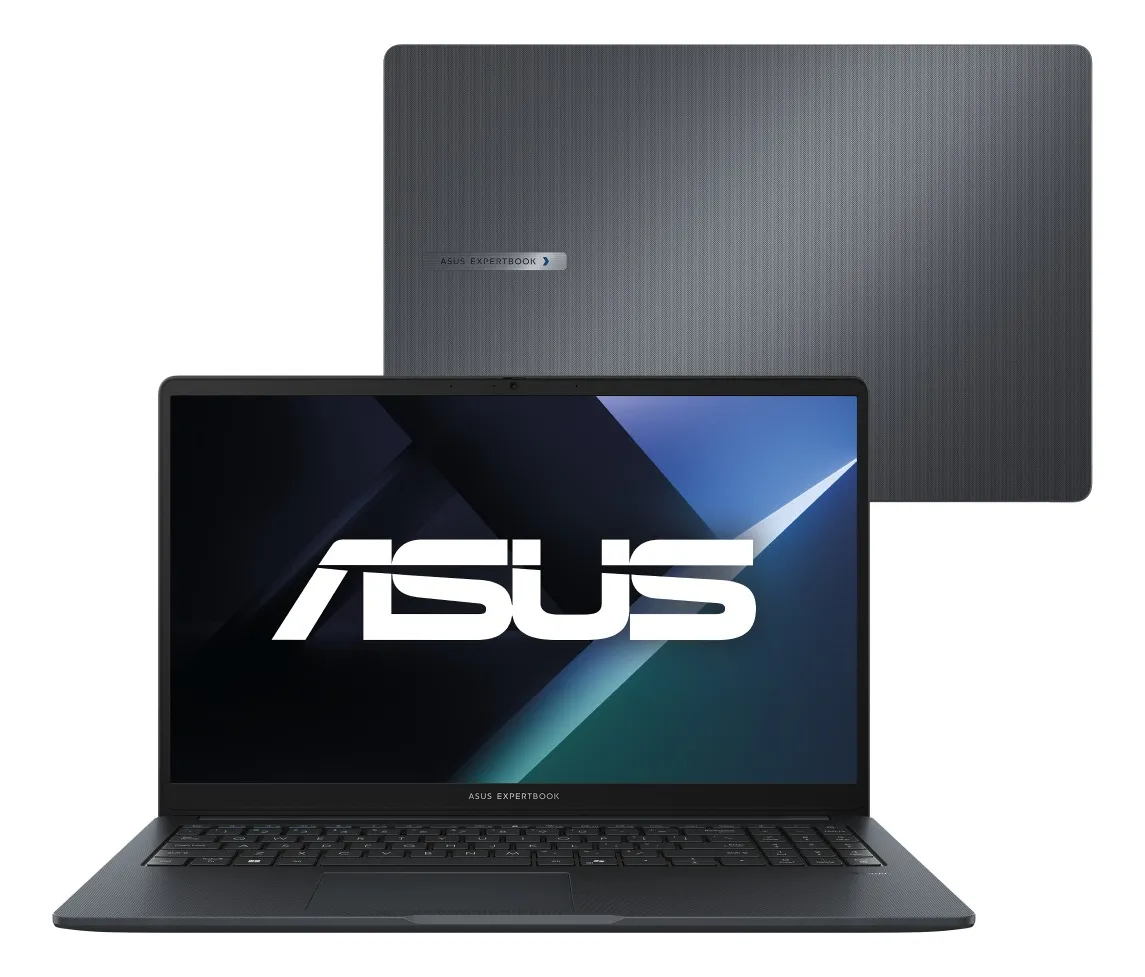
The ASUS ExpertBook B1 B1503CVA is a 15.6-inch notebook built around a productivity-first profile. The configuration indicated for this model includes an Intel Core i5-13420H processor, 8GB of RAM, 256GB SSD storage, a Full HD screen and Windows 11 Pro. That combination places it closer to users who need a reliable work machine than to users searching for a gaming notebook or a high-end creative workstation.
The Intel Core i5-13420H is one of the key points of the configuration. In practical terms, it gives the notebook enough processing headroom for common professional tasks such as office suites, cloud platforms, multiple browser tabs, video meetings, file handling, reports, presentations and everyday management systems. For a laptop in this profile, the processor is a positive sign because it suggests the machine is not limited to very basic use.
The presence of Windows 11 Pro also matters. This version is especially relevant for business environments, small companies, remote workers and users who depend on professional compatibility. It can be a better fit than a home-oriented system when the notebook will be used with corporate accounts, work policies, professional software or administrative routines.
The 15.6-inch Full HD screen is another practical part of the package. It gives more workspace than compact notebooks, which helps when working with spreadsheets, documents, dashboards and browser-based systems. It is not the most portable screen size, but it is often more comfortable for long sessions at a desk.
The 8GB RAM and 256GB SSD choice deserves attention
The biggest mistake when buying this type of notebook is looking only at the processor and ignoring memory and storage. The Core i5-13420H gives the ASUS ExpertBook B1 good potential for productivity, but the 8GB RAM and 256GB SSD configuration defines the practical limits of the experience.
For everyday work, 8GB of RAM can be enough. It handles documents, email, messaging apps, video calls and moderate browser use. The experience should be comfortable when the routine is organized and the number of open applications is reasonable. It is a sensible baseline for users who mainly work with office tasks and online tools.
The point of attention appears when multitasking becomes heavier. Many browser tabs, spreadsheets with large data sets, background apps, video calls and cloud synchronization running at the same time can make 8GB feel more limited. The notebook can still be useful, but users who keep everything open all day may want to think carefully before choosing this configuration.
The 256GB SSD is fast enough for a responsive system, quick startup and smooth app opening. The limitation is capacity. It works well for people who rely on cloud storage, external drives or a clean file organization routine. It can become restrictive for users who store many videos, large project files, offline backups, heavy software packages or extensive media libraries.
Where the Core i5-13420H helps in real productivity
The strongest practical advantage of this ExpertBook B1 configuration is processing capability for everyday professional workloads. It should make sense for people who need a notebook that feels responsive while switching between documents, browser tabs, online meetings, spreadsheets and management tools.
For office work, the setup is well aligned. Writing reports, preparing presentations, managing spreadsheets, using email clients and accessing web platforms are tasks that fit the proposal of this notebook. It is also a good match for students who want a Windows laptop for research, classes, assignments and productivity software.
For remote work, the combination of a 15.6-inch Full HD display and Windows 11 Pro is useful. A larger screen improves comfort when reading, editing and comparing documents. The professional operating system also supports a more serious work environment, especially for users who interact with business accounts or organizational systems.
Another positive point is the SSD. Even with modest capacity, SSD storage contributes to a faster daily feel than older hard drive-based notebooks. Startup, file access and software loading tend to feel more agile, which matters more in daily use than many buyers realize.
The business-oriented design is also part of the value proposition. A notebook like this is usually chosen for practicality, not for visual impact. The gentle grey finish and professional positioning fit offices, home workstations, classrooms and client-facing environments without calling too much attention.
Where expectations should stay realistic
The ASUS ExpertBook B1 B1503CVA is not the best choice for every type of user. The processor is capable, but the overall configuration is still shaped by 8GB of RAM and 256GB of storage. That means it is better viewed as a productivity laptop than as a machine for demanding creative or entertainment workloads.
It may frustrate users who expect to edit large videos, work with heavy design projects, run virtual machines comfortably or keep many demanding apps open at the same time. In those cases, the processor alone does not solve everything. Memory capacity and storage space become just as important as raw CPU performance.
It is also not a gaming-focused laptop. The product proposal, business positioning and configuration point to work and general use. Anyone looking for high frame rates, dedicated gaming graphics or a machine mainly for modern games should compare it with notebooks designed specifically for that purpose.
The storage capacity is another point to evaluate before buying. A 256GB SSD can work very well for cloud-based routines, but it requires discipline. If you regularly download large files, install many applications or store media locally, you may need external storage or a configuration with more internal space.
Battery expectations should also be practical. Real battery life depends on screen brightness, background apps, video calls, browser load and power settings. For this reason, it is better to evaluate this notebook as a work machine that can move between spaces, not as a device chosen primarily for maximum unplugged autonomy.
Screen, system and configuration in practical use
The 15.6-inch Full HD screen is one of the most important usability points of the ASUS ExpertBook B1 B1503CVA. Full HD resolution is a good standard for productivity because it keeps text, spreadsheets and browser interfaces clearer than lower-resolution panels. For long reading and document work, this makes a noticeable difference.
The screen size also helps with split-screen use. You can keep a document on one side and a browser, spreadsheet or messaging app on the other. This is especially useful for students, administrative professionals, analysts, support teams and anyone who works with information from multiple sources.
Windows 11 Pro reinforces the professional profile. For personal use, Windows 11 Home is often enough, but Pro makes more sense when the laptop is part of a work routine. It is a more business-ready environment for users who need compatibility with company workflows and professional settings.
The 8GB RAM configuration should be understood as suitable for standard productivity. It is not a deal-breaker for many users, but it is the part of the setup most likely to define how long the notebook remains comfortable as workloads grow. If your routine is light to moderate, it fits. If your work is heavy and constant, a higher-memory configuration may be more appropriate.
The 256GB SSD is similar: good for speed, modest for capacity. Users who work mainly in the cloud will likely find it manageable. Users who keep years of files locally should plan storage carefully from the beginning.
The work profile that fits this ASUS best
This notebook makes the most sense for professionals who need a serious daily machine without moving into a premium workstation category. It is suitable for office workers, students, small business owners, sales teams, administrative users, teachers, consultants and remote workers who rely on productivity software and web platforms.
It also fits users who want Windows 11 Pro already aligned with a professional routine. That can be important for companies or individuals who prefer a business-oriented system from the start instead of adapting a more basic consumer setup later.
The ASUS ExpertBook B1 B1503CVA is also a reasonable option for people replacing an older notebook that feels slow in simple tasks. The SSD and modern Core i5 processor can deliver a more responsive everyday experience, especially for users coming from older machines with slower storage or entry-level processors.
It is a practical choice if you value a larger screen for work. A compact laptop is easier to carry, but a 15.6-inch display is often better for productivity. If the notebook will spend most of its time on a desk, the larger format may be a benefit rather than a drawback.
When a different notebook may make more sense
A different model may be better if your routine involves heavy creative software, advanced photo editing, frequent video editing, engineering tools, modern games or large data processing. In those scenarios, you should evaluate notebooks with more RAM, larger SSD capacity and, when needed, dedicated graphics.
It may also be worth looking elsewhere if portability is your top priority. A 15.6-inch notebook is comfortable for work, but it is not as compact as smaller models. If you travel daily with the laptop and work mostly on the go, a lighter and smaller machine may be more convenient.
Users who store many files locally should also compare alternatives with more internal storage. The 256GB SSD is usable, but it is not generous. A larger SSD can reduce the need for constant file cleanup and external drives.
If your routine is very basic, this ExpertBook may offer more processing power and professional orientation than you actually need. For simple browsing, streaming and occasional document editing, a lighter consumer notebook may already be enough. The ExpertBook B1 makes more sense when work reliability and professional use are part of the decision.
How it compares with consumer laptops and leaner business models
Compared with many consumer notebooks, the ASUS ExpertBook B1 B1503CVA has a more work-focused identity. The presence of Windows 11 Pro and the ExpertBook positioning make it feel more aligned with productivity, office use and professional environments than with casual entertainment.
Against more basic business laptops, the Core i5-13420H is a relevant advantage. It gives the configuration stronger processing potential for multitasking and sustained productivity than notebooks built around very entry-level chips. That matters for users who need the machine to keep up with real work rather than only simple browsing.
Against more advanced business laptops, the main difference is likely to be memory, storage and premium features. Higher-tier machines may offer more comfortable configurations for demanding workflows, but they also target a different user profile. The ExpertBook B1 B1503CVA sits in a practical middle ground: serious enough for work, but still focused on everyday productivity.
Compared with compact ultrabooks, the 15.6-inch screen is both a strength and a trade-off. It improves viewing comfort and workspace, but it is less ideal for people who want maximum portability. The right choice depends on whether you value desk comfort or travel convenience more.
The best comparison is not only about specifications. It is about routine. If your work happens mostly in documents, browser systems, spreadsheets, email and meetings, this ASUS has a coherent proposal. If your routine is graphics-heavy or storage-heavy, the same configuration becomes less convincing.
A clear buying decision for productivity-focused users
The ASUS ExpertBook B1 B1503CVA is a good candidate for buyers who want a business-style laptop with a capable processor, Full HD screen and Windows 11 Pro. It is especially attractive for users who need a dependable everyday work notebook and do not want to rely on a very basic configuration.
The strongest reason to choose it is balance. The Core i5-13420H gives it solid productivity potential, the SSD supports fast everyday responsiveness, the Full HD display improves work comfort and Windows 11 Pro fits professional use. Together, those elements create a notebook that feels coherent for office and study routines.
The main reason to hesitate is not the processor, but the memory and storage combination. The 8GB RAM and 256GB SSD setup is acceptable for many users, but not ideal for everyone. If your work is heavy, your files are large or your multitasking is constant, it is worth comparing configurations before deciding.
For the right user, this ExpertBook is a practical and sensible choice. It should satisfy people who need a professional Windows notebook for daily productivity, online work and organized multitasking. It is not the best fit for gaming, heavy editing or very large local storage needs, and that distinction is essential for a confident purchase.
Is the ASUS ExpertBook B1 B1503CVA good for office work?
Yes, the ASUS ExpertBook B1 B1503CVA is well suited for office work. Its Intel Core i5-13420H processor, SSD storage, Full HD screen and Windows 11 Pro setup match tasks such as documents, spreadsheets, email, online platforms, presentations and video meetings. It is best for users with light to moderate multitasking needs.
Is 8GB RAM enough on this ASUS ExpertBook B1?
Yes, 8GB RAM can be enough for everyday productivity. It works for browsing, office apps, study tasks, email and common business systems. The point of attention is heavier multitasking. If you keep many tabs, large spreadsheets and several apps open all day, a configuration with more memory may feel more comfortable.
Is the 256GB SSD a problem for daily use?
No, the 256GB SSD is not a problem if your routine is cloud-based or well organized. It helps the system feel fast and responsive. However, it can become limited if you store many videos, large documents, offline backups or heavy software locally. Storage habits matter a lot with this configuration.
Can this notebook be used for studying?
Yes, this notebook can be a strong option for studying. The 15.6-inch Full HD screen helps with reading, research and document editing, while the processor supports classes, browser tabs and productivity apps. It is especially useful for students who also want a machine capable of work-related tasks.
Is the ASUS ExpertBook B1 B1503CVA good for gaming?
No, this is not the best choice if gaming is the main goal. The ExpertBook B1 is a business and productivity notebook, not a gaming laptop. It may handle very light games depending on requirements, but users who want modern games, high graphics settings or dedicated gaming performance should choose another category.
Does Windows 11 Pro make a difference?
Yes, Windows 11 Pro can make a difference for professional users. It is more aligned with business routines, company accounts, administrative settings and work environments than a basic home-oriented setup. For personal casual use, it may not be essential, but for work it adds value to the overall proposal.
Who should avoid this configuration?
Users who need heavy video editing, advanced design work, large local storage, virtual machines or demanding multitasking should compare stronger configurations. The processor is capable, but 8GB RAM and 256GB SSD are practical limits. For heavier workloads, more memory and storage can be more important than choosing by processor alone.
Is the 15.6-inch Full HD screen a good size?
Yes, the 15.6-inch Full HD screen is a good size for productivity. It gives more room for documents, spreadsheets, browser windows and reading than smaller displays. The trade-off is portability, since larger notebooks are less compact. It is ideal for users who value work comfort over minimum size.
The ASUS ExpertBook B1 B1503CVA is a sensible business notebook for users who want practical performance, a professional Windows environment and a comfortable screen for daily work. It is strongest in productivity, study, administration and remote work routines where reliability and compatibility matter more than entertainment features.
The safest way to decide is to look at your real workload. If you mainly use documents, spreadsheets, browser systems, meetings and cloud storage, this configuration is coherent. If you need heavy multitasking, large local storage or creative performance, a more robust setup will be the better long-term choice.