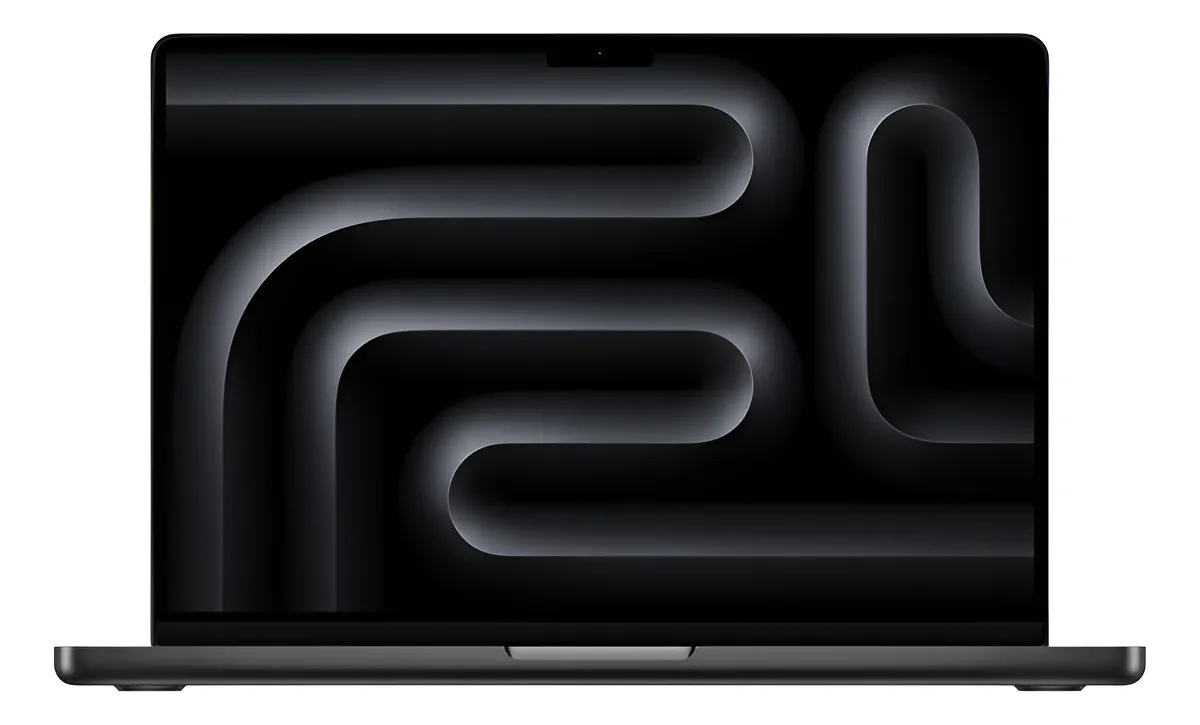
A focused look at the 14-inch MacBook Pro with Apple M5, 16GB unified memory, 512GB SSD and Space Black finish for users deciding whether this is the right Mac for work, study and creative tasks.
The Apple 2025 MacBook Pro 14-inch M5 is worth considering if you want a compact professional laptop with strong performance, an excellent Liquid Retina XDR display, long battery life and the macOS ecosystem. The 16GB and 512GB configuration makes the most sense for demanding everyday users, students, developers, business professionals and creators who do not need the extra headroom of M5 Pro or M5 Max models.
The Apple 2025 MacBook Pro 14-inch M5 review starts with a simple buying question: is this configuration powerful enough, or should you move to a higher-tier MacBook Pro? For many users, the answer depends less on the M5 chip itself and more on memory, storage, ports, display expectations and how long they plan to keep the laptop.
This model is positioned as the entry point into the current 14-inch MacBook Pro line, but it is not a basic notebook. It combines Apple’s M5 chip, a professional-grade display, strong battery claims, premium construction and a compact format that can handle far more than casual browsing.
What the 14-inch M5 MacBook Pro is built to do
The 2025 14-inch MacBook Pro with M5 is designed for users who want professional performance without moving into the heavier, higher-tier configurations. The listed model combines the Apple M5 processor, a 10-core CPU, a 10-core GPU, 16GB of unified memory and 512GB of SSD storage.
That combination is important because it defines the real identity of this machine. It is not the most extreme MacBook Pro configuration, but it is much stronger than a lightweight laptop aimed only at web browsing, office tasks or streaming.
The 14-inch Liquid Retina XDR display is one of its strongest arguments. With a high-resolution panel, ProMotion refresh technology and strong brightness capability, it is built for people who care about image quality, text sharpness and color consistency. This matters for photo editing, video timelines, design work, coding, research and long writing sessions.
The Space Black finish gives the laptop a more serious and understated look than silver. It fits the professional tone of the MacBook Pro line, although buyers who are sensitive to fingerprints or visible marks should expect to clean the surface from time to time.
The product listing also points to a Spanish keyboard. That detail deserves attention before buying, especially for users who type mostly in English or another language. The Mac can still be configured for different input languages in software, but the physical key legends and layout can affect typing comfort.
The configuration detail that can decide the purchase
The biggest decision point in this model is not the M5 chip. It is the balance between 16GB of unified memory and 512GB of storage.
For many people, 16GB of unified memory is a strong baseline. It is suitable for multitasking, browser tabs, office apps, light to moderate creative work, coding, online meetings and everyday productivity. Because Apple silicon uses unified memory, the system shares memory efficiently between CPU, GPU and other components.
Still, 16GB can become restrictive for users who regularly work with large video projects, heavy virtual machines, advanced 3D scenes, big datasets or several professional apps open at the same time. If your work often involves memory-heavy software, a higher-memory configuration can be a safer long-term choice.
The 512GB SSD is also enough for disciplined users, but not for everyone. It works well if you use cloud storage, external drives and do not keep large media libraries on the laptop. It can feel tight if you edit video, store RAW photo collections, download large development environments or keep many local projects.
This is the point that most often creates buyer regret. The M5 chip may remain capable for years, but memory and internal storage cannot be treated casually if your workflow grows. If you already know that your current laptop is constantly full, the 512GB version requires a clear storage strategy.
Daily performance, creative work and AI tasks
The M5 chip is the main performance upgrade in this MacBook Pro. With a 10-core CPU and 10-core GPU, it is made for responsive multitasking, smoother creative workflows and better handling of AI-related tasks than older Apple silicon generations.
For everyday use, this means the laptop should feel fast in the tasks most people repeat all day. Opening apps, switching between windows, running multiple browser tabs, editing documents, handling video calls and managing large files should feel fluid.
For creators, the M5 model makes sense for photo editing, design projects, music production, lighter video editing and content workflows that benefit from Apple’s media engine. It supports hardware-accelerated formats such as H.264, HEVC, ProRes and ProRes RAW, which is especially useful for users working with Apple-friendly video pipelines.
Developers can also benefit from the CPU performance and fast storage behavior. Code compilation, local development tools, databases, design apps and productivity software can run comfortably on this configuration, as long as the workload does not depend heavily on large virtualized environments or very high memory ceilings.
Apple Intelligence and on-device AI are part of the appeal. The M5 includes Neural Accelerators, hardware-accelerated ray tracing and a 16-core Neural Engine, giving the machine a stronger foundation for local AI features and AI-assisted creative tools. This does not mean every AI task will be instant, but it does make the laptop more future-facing than older models.
Where this model can feel restrictive
The base M5 version is powerful, but it is still the entry configuration within the 14-inch MacBook Pro family. Buyers should not confuse it with the higher M5 Pro or M5 Max options.
The first restriction is graphics headroom. The 10-core GPU is capable for many creative and productivity tasks, but users working with demanding 3D rendering, complex motion graphics, high-end game development or heavy GPU acceleration may be better served by a higher-tier chip.
The second restriction is long-term memory flexibility. Since memory is not something you upgrade later in a MacBook Pro, choosing 16GB should be a deliberate decision. It is a good fit for many users, but less ideal for people who want maximum longevity under heavy professional workloads.
The third restriction is storage discipline. The 512GB SSD keeps the configuration practical, but it requires external storage planning for creators. Large video files, high-resolution photo libraries, sample libraries, local backups and project archives can fill the drive faster than expected.
Connectivity is strong, but not unlimited. This model includes useful professional ports, but users who want the latest high-end connectivity available on stronger MacBook Pro configurations should compare carefully before choosing. For many buyers, the port selection will be more than enough; for studio setups, it depends on the accessories and displays already in use.
Display, battery, ports and real-world hardware details
The display is one of the strongest reasons to choose this MacBook Pro over lighter Mac options. The 14.2-inch Liquid Retina XDR panel has a 3024-by-1964 resolution, support for a wide color range, ProMotion adaptive refresh rates up to 120Hz and strong HDR capability.
In daily use, that translates into sharp text, smooth scrolling and a more comfortable experience for long work sessions. For creative users, the display quality is especially valuable when editing images, reviewing video, designing layouts or working with detailed visual material.
Battery life is another major strength. The M5 14-inch MacBook Pro is rated for up to 24 hours of video streaming and up to 16 hours of wireless web use, though real endurance depends on brightness, workload, connected accessories and app behavior.
The port selection is practical for a compact professional laptop. The model includes MagSafe 3 charging, three Thunderbolt 4 USB-C ports, HDMI, an SDXC card slot and a headphone jack. This matters because it reduces the need for adapters compared with thinner laptops that depend almost entirely on USB-C.
Wireless connectivity includes Wi-Fi 6E where supported and Bluetooth 5.3. That is strong for most users, although buyers specifically chasing the newest wireless standards should compare this base M5 version with higher-tier models before deciding.
The listing also mentions a 70W USB-C power adapter and a USB-C to MagSafe 3 cable. Fast charging is supported with a stronger compatible adapter, which can be useful for people who work between meetings, classrooms, airports or shared offices.
Portability is another strength. At roughly 1.55 kg, this MacBook Pro is not as light as an ultra-thin laptop, but it remains very portable for the performance class. It is a good size for a backpack, desk, coffee shop, classroom or travel setup.
The buyer who gets the most from this MacBook
This MacBook Pro is a strong match for users who want one machine for productivity, study, creative work and long-term reliability. It is especially attractive if you already use an iPhone, iPad or other Apple devices, because macOS integrates naturally with the broader Apple ecosystem.
Students in demanding fields can benefit from the combination of battery life, display quality and performance. It is more machine than a basic student laptop, but it makes sense for courses involving programming, design, media, engineering tools, research or heavy multitasking.
Business users may appreciate the performance consistency, premium build, strong webcam and audio features, security foundation and long unplugged work sessions. It is a practical choice for people who move between office, home and travel while needing a reliable primary computer.
Creators who edit photos, produce content, work on design projects or handle moderate video editing can also get excellent use from this configuration. The screen and media capabilities are the real advantages here, not just the processor.
It also makes sense for users upgrading from older Intel-based Macs or early Apple silicon machines. The leap in performance, battery efficiency and display quality can feel substantial, especially if the old laptop struggles with modern apps or battery life.
Cases where another Mac makes more sense
This is not the best choice for every buyer. If your work is mostly browsing, email, streaming, documents and light office tasks, a MacBook Air may deliver enough performance in a lighter package. The MacBook Pro is more attractive when you actually benefit from its display, ports, sustained performance and battery profile.
If you are a professional video editor, 3D artist, machine learning user, advanced developer or studio-based creator, the base M5 configuration may not be the smartest ceiling. In those cases, a MacBook Pro with a stronger chip, more memory or more storage can be a better long-term tool.
If you need maximum internal storage because you travel without external drives, 512GB may not be comfortable. Cloud storage helps, but it is not always ideal for large files, slow connections or projects that need immediate local access.
The Spanish keyboard is another reason some buyers may pause. It can be perfectly usable, especially for multilingual users, but anyone who strongly prefers a different physical layout should confirm that detail before choosing this specific listing.
Gamers should also think carefully. The M5 GPU improves graphics capability, and macOS gaming continues to improve, but this laptop is still not the obvious choice for someone whose main priority is a broad gaming library.
How it compares with lighter and stronger alternatives
Compared with a MacBook Air, the 14-inch MacBook Pro M5 is the more serious work machine. The Air is lighter and simpler, but the Pro offers a better display, more ports, stronger sustained performance and a more professional hardware package.
Compared with older M1 or Intel-based MacBooks, this model is a much more modern upgrade. The performance improvement, battery efficiency, display quality and Apple Intelligence readiness make it a strong step forward for users holding onto older machines.
Compared with an M4 MacBook Pro, the decision is more nuanced. The M5 brings better AI-oriented performance and updated internal capability, but users who already own a recent MacBook Pro may not feel an urgent need to upgrade unless their workflow directly benefits from the improvements.
Compared with M5 Pro or M5 Max models, this base M5 version is the practical choice rather than the extreme one. It is easier to justify for mixed daily work, study, business use and moderate creative projects. The stronger versions are better when time savings in demanding workloads matter every day.
Against premium Windows laptops, the MacBook Pro’s advantage is the combination of battery life, macOS, build quality, display and performance consistency. The trade-off is software preference, platform compatibility and whether your professional tools work better on Windows or macOS.
A clear purchase decision for the 16GB and 512GB model
The Apple 2025 MacBook Pro 14-inch M5 with 16GB unified memory and 512GB SSD is a strong buy for users who want a compact professional Mac and understand the configuration. It is powerful, refined and well balanced for serious daily use.
It is best for people who need more than a MacBook Air but do not need the maximum performance of the upper MacBook Pro line. That includes students, developers, consultants, entrepreneurs, office professionals, writers, designers and content creators with moderate workflows.
The decision becomes weaker if you expect to keep huge media libraries on the internal drive, run memory-heavy professional tools every day or rely on high-end GPU performance. In those cases, choosing more memory, more storage or a stronger chip can be more comfortable.
For the right buyer, this model offers the MacBook Pro experience in a compact and mature form. The display, battery, ports, keyboard, trackpad, speakers and M5 performance create a laptop that feels professional from the first day and should remain useful for years if the configuration matches your workflow.
Is the Apple 2025 MacBook Pro 14-inch M5 good for students?
Yes, it is a strong choice for students who need more than basic performance. It is especially useful for programming, design, research, media work and heavy multitasking. For simple note-taking and web use, it may be more machine than necessary, but for demanding courses it offers excellent longevity and a high-quality display.
Is 16GB of unified memory enough on the M5 MacBook Pro?
Yes, 16GB is enough for many users who work with office apps, browsers, coding tools, photo editing, content creation and moderate multitasking. It becomes less ideal if you regularly use virtual machines, very large datasets, advanced video projects, 3D software or several professional apps at the same time.
Is 512GB storage enough for this MacBook Pro?
Yes, 512GB can be enough if you use cloud storage, external SSDs and keep your local files organized. It may feel restrictive for video editors, photographers, developers with large environments or users who store many files locally. Storage habits should be considered before choosing this configuration.
How good is the display on the 14-inch MacBook Pro M5?
Very good, because the Liquid Retina XDR display is one of the main reasons to choose this laptop. It offers sharp resolution, strong brightness, wide color support and smooth refresh behavior. It is especially valuable for creative work, long reading sessions, detailed spreadsheets, coding and visual review.
Does the M5 MacBook Pro make sense for video editing?
Yes, it makes sense for many video editing workflows, especially moderate projects and formats that benefit from Apple’s media engine. It supports hardware acceleration for major professional codecs. For heavy multi-layer editing, large libraries or advanced effects, more memory and storage may be a better long-term choice.
Is the Space Black finish a good option?
Yes, Space Black is a polished and professional-looking finish that suits the MacBook Pro design well. It gives the laptop a more discreet and modern appearance. Users who dislike visible marks should remember that darker finishes can show fingerprints and smudges more easily than lighter colors.
Should I choose this model or a MacBook Air?
Choose this model if you care about the better display, stronger sustained performance, more ports and a more professional hardware package. Choose a MacBook Air if your work is lighter and portability is your main priority. The MacBook Pro is the better fit when the screen and performance really matter.
Is the Spanish keyboard a problem for English typing?
Not necessarily, but it depends on your typing habits. macOS can use different input settings, yet the physical key layout and printed legends remain Spanish. If you type mostly in English and strongly prefer a familiar layout, confirm that this keyboard style will be comfortable before buying.
The Apple 2025 MacBook Pro 14-inch M5 is one of the most balanced choices for users who want a serious Mac without moving into the highest-performance configurations. Its main strengths are the M5 chip, the excellent Liquid Retina XDR display, strong battery profile, premium build, useful ports and compact professional format.
The 16GB and 512GB version works best when the buyer has realistic expectations. It is a powerful everyday and creative machine, but not the ideal configuration for everyone. If your workload is moderate to demanding and your storage habits are organized, this MacBook Pro is a confident and practical choice. If you already know your projects are heavy, the smarter move is to choose more headroom from the start.