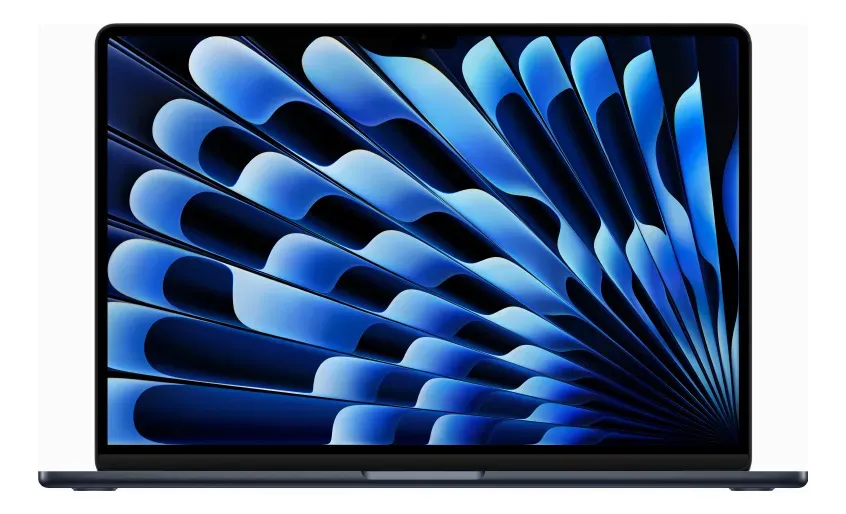
A practical look at Apple’s compact M2 laptop with 24GB of unified memory, 512GB SSD storage and a Midnight finish.
The MacBook Air M2 13-inch review points to a clear answer: this configuration makes the most sense for users who want a lightweight Mac with strong everyday performance, extra memory headroom and a premium design without moving into a heavier professional laptop. It is especially attractive for work, study, travel, writing, browsing, video calls, light creative tasks and long-term use with many apps open. It is not the best choice for users who need sustained heavy rendering, advanced gaming, many built-in ports or a display aimed at high-end professional color workflows.
The MacBook Air M2 remains one of Apple’s most interesting laptop designs because it combines portability, silent operation and a modern Apple Silicon platform in a slim body. This version stands out because it is not the basic memory configuration: it includes 24GB of unified memory and 512GB of SSD storage, which changes the way the laptop fits into real daily use.
For buyers comparing compact laptops, the main question is not only whether the M2 chip is fast. The better question is whether this specific MacBook Air gives enough performance, memory, storage and comfort for the way you actually work. That is where this configuration becomes more compelling than many entry-level models.
Why this 13-inch MacBook Air M2 configuration stands out
This MacBook Air is built around Apple’s M2 chip, paired here with an 8-core CPU, 8-core GPU and 16-core Neural Engine. That hardware profile is designed for fast everyday computing rather than workstation-class sustained performance. It handles common tasks smoothly, opens apps quickly and keeps the overall experience responsive across macOS.
The major differentiator is the 24GB of unified memory. On Apple Silicon Macs, unified memory is shared efficiently between the CPU, GPU and system tasks. That means the laptop can manage heavier multitasking more comfortably than a basic configuration with less memory.
This matters if you keep many browser tabs open, work with large documents, edit images, manage spreadsheets, use productivity suites, join video calls while multitasking or run creative apps in a moderate way. The extra memory does not turn the MacBook Air into a MacBook Pro, but it gives the system more room before it starts feeling constrained.
The 512GB SSD is also a sensible middle ground. It gives more breathing room for apps, work files, media, downloads and system updates than smaller entry-level storage. Users with large video libraries, professional photo archives or heavy project folders may still rely on external drives or cloud storage, but this capacity is more comfortable for long-term everyday use.
The Midnight finish gives the laptop a more dramatic, modern look. It is sleek and distinctive, especially for users who prefer darker devices. The trade-off is that darker finishes can show fingerprints and smudges more easily, so buyers who want the cleanest appearance with the least maintenance may prefer a lighter color.
The memory and storage choice matters more than the chip name
Many buyers focus only on the processor generation, but the configuration often matters just as much. The M2 chip is still highly capable for everyday work, but pairing it with 24GB of unified memory makes this version more flexible than a lower-memory MacBook Air.
That is important because memory cannot be upgraded later in this type of Mac. The choice made at purchase determines how much headroom the machine has for future software updates, heavier browsing habits and more demanding workflows. If you expect to keep the laptop for several years, 24GB is a meaningful advantage.
The 512GB SSD follows the same logic. Storage is also not designed for simple internal upgrades after purchase. A smaller drive can work for cloud-first users, but it becomes restrictive faster when apps, photos, videos, offline files and system data accumulate over time.
This configuration is not automatically the right one for everyone. A casual user who mostly writes, watches videos and browses with a few tabs open may not need this much memory. But for students, professionals and remote workers who want smoother multitasking, the memory upgrade is one of the most practical strengths of this model.
The key point is simple: this version is less about buying the cheapest MacBook Air and more about choosing a compact laptop with better long-term comfort. It makes sense for users who value portability but do not want to feel boxed in by the most basic specification.
Everyday speed, portability and battery confidence
In daily use, the MacBook Air M2 is built for speed without noise. Because it uses a fanless design, it stays silent during normal work. That is a major advantage for people who study in quiet environments, work in shared spaces, record audio, attend meetings or simply prefer a laptop that does not distract them.
The 13-inch class body is easy to carry in a backpack, office bag or travel setup. It is slim enough for mobile work but still large enough to feel comfortable for writing, research, email, planning and browser-based tasks. The design works well for people who move between home, office, university and cafés.
The display is one of the strengths of the experience. The MacBook Air M2 uses a 13.6-inch Liquid Retina display with sharp text, vivid colors and enough brightness for most indoor and controlled outdoor situations. It is not a high-refresh professional display, but it is very pleasant for general productivity, streaming, reading and light creative work.
The keyboard and trackpad also help the MacBook Air feel premium. Apple’s Magic Keyboard is comfortable for long typing sessions, and the large Force Touch trackpad remains one of the best parts of the Mac experience. For users who write often, manage documents or work in browsers all day, these details matter more than they may seem on a spec sheet.
Battery life is another strong reason to consider this model. The M2 MacBook Air platform is designed for efficient performance, which makes it suitable for long workdays, travel and study sessions away from a charger. Heavy creative use will drain the battery faster, but for normal productivity the endurance is one of its strongest practical advantages.
Trade-offs to know before choosing the Midnight Air
The MacBook Air M2 is powerful for its category, but it is still an Air. The fanless design is excellent for silence and portability, but it also means the laptop is not optimized for long, sustained heavy workloads. If you render large video projects, compile code for extended sessions or push graphics-heavy work regularly, a MacBook Pro may be a safer choice.
Port selection is another point to consider. The MacBook Air M2 includes MagSafe charging, two Thunderbolt and USB 4 ports, and a headphone jack. That is enough for many users, but it may feel limited if you often connect multiple accessories, external drives, displays, card readers or wired peripherals at the same time.
The laptop can work well with hubs and adapters, but buyers who dislike dongles should think carefully before choosing it. This is especially true for photographers, video editors, musicians and office users with several accessories on their desk.
The display is attractive, but it is not the same kind of screen found on more expensive professional Apple laptops. Users who need advanced display technology for high-end color grading, HDR-heavy workflows or the smoothest motion may want to compare it with higher-tier models.
The Midnight finish is beautiful, but it has a practical downside: it can show marks more easily than lighter finishes. This does not affect performance, but it can matter for people who are sensitive to fingerprints or want the device to look clean with minimal care.
Another point is the age of the M2 generation. The M2 chip remains capable, but newer MacBook Air models offer more recent processors and may be more attractive for users who prioritize the latest platform. This M2 configuration competes best when the buyer values its stronger memory and storage balance rather than simply chasing the newest chip.
What the M2 hardware means in daily work
The Apple M2 chip in this MacBook Air combines an 8-core CPU with performance and efficiency cores. In practice, that means the laptop can feel fast in normal tasks while keeping energy use under control. Opening apps, switching between windows, browsing, writing, editing documents and managing communication tools should feel smooth.
The 8-core GPU is suitable for light creative work, casual design, basic video editing and visual tasks that do not demand a dedicated professional graphics setup. It is not aimed at serious gaming or constant high-end 3D work, but it is more than enough for many creative and productivity users.
The 16-core Neural Engine supports machine learning tasks within macOS and compatible apps. For most buyers, this is not something they will measure directly every day. Its value is more visible in background intelligence, media processing, app features and Apple’s broader system-level optimization.
The 24GB unified memory is the most important performance-related detail in this configuration. It gives the laptop more space for multitasking and helps reduce the feeling of slowdown when multiple apps are open. This is especially useful for users who work with browser-heavy workflows, office tools, messaging apps and creative software at the same time.
The 512GB SSD supports quick app launches and responsive file handling. It is a practical amount for many users, but storage habits still matter. Anyone who keeps large video files, raw photo libraries or offline backups should plan for external storage or a disciplined cloud workflow.
The camera, speakers and microphones also support the laptop’s role as a work and study device. The 1080p FaceTime HD camera is useful for video meetings, online classes and remote collaboration. The audio setup is strong for a compact laptop, making it comfortable for calls, media and casual content consumption.
The buyer profile that gets the most from this MacBook Air
This MacBook Air makes the most sense for users who want a premium portable laptop and expect to multitask heavily. It is a strong fit for students, writers, consultants, business users, remote workers, marketers, teachers and professionals who spend most of the day inside browsers, documents, presentations, email and communication apps.
It also works well for light to moderate creative work. If you edit photos, create social media content, manage websites, handle design files, produce simple videos or work with content planning tools, the combination of M2 performance and 24GB memory gives a comfortable experience.
The model is also appealing for people who want a quiet laptop. Because there is no fan, it stays silent during normal operation. That makes it excellent for libraries, offices, classrooms, bedrooms and recording-friendly spaces.
Travel-focused users will appreciate the size and battery profile. The MacBook Air is easy to carry and does not feel like a burden during daily movement. For people who work from several locations, portability is not just a convenience; it directly affects how often the laptop is used.
Another ideal buyer is someone who wants a Mac for several years and prefers to avoid the most basic memory configuration. The 24GB setup gives more long-term confidence, especially as apps and operating systems become more demanding over time.
Cases where another Mac makes more sense
This MacBook Air is not the strongest option for everyone. If your work depends on sustained high-performance loads, such as long video exports, intensive 3D rendering, professional animation, heavy software builds or advanced music production with large projects, a MacBook Pro is more appropriate.
It may also be less ideal for users who need a larger built-in screen. The 13-inch class display is excellent for portability, but people who work with many windows, timelines, spreadsheets or visual layouts may prefer a larger MacBook Air or an external monitor setup.
Users who need many ports should also think carefully. The MacBook Air M2 can be expanded with hubs, but the built-in port selection is minimal. If your workflow includes multiple wired accessories every day, that can become inconvenient.
It is also not the best choice for users who prioritize the newest Apple chip above all else. Newer MacBook Air generations may offer advantages in performance, external display support, efficiency or future platform longevity. The M2 version is still capable, but the decision should be based on the full configuration, not only the model name.
Finally, buyers who mainly use a laptop for simple browsing, streaming and basic writing may not fully benefit from 24GB of unified memory. The machine will still be excellent, but a simpler configuration could already cover that lighter profile.
How it compares with newer Air models and Pro laptops
Compared with entry-level MacBook Air configurations, this 24GB M2 model offers a stronger multitasking profile. The chip generation may not be the latest, but the memory advantage can matter more in real-world use for people who keep many apps open.
Compared with newer MacBook Air models, the main question is whether you prefer a newer processor or this specific memory and storage combination. A newer chip may deliver better performance and longer platform relevance, but a lower-memory configuration can still feel more restricted under heavy multitasking.
Compared with a MacBook Pro, the MacBook Air M2 is lighter, quieter and more portable. The Pro line is better for sustained performance, more demanding creative workloads and users who need a more advanced display or broader professional feature set. The Air is better when mobility and everyday responsiveness matter more than maximum power.
Compared with many Windows ultraportables, the MacBook Air stands out for build quality, trackpad experience, battery efficiency and integration with the Apple ecosystem. It is particularly attractive for people who already use an iPhone, iPad, AirPods or iCloud services.
The right comparison is not simply “Air versus Pro” or “M2 versus newer chip.” The more useful comparison is based on your workload. For productivity, study, writing, remote work and moderate creative use, this MacBook Air configuration sits in a very strong middle position.
The buying decision in one clear direction
This MacBook Air M2 13-inch is worth considering if you want a compact Mac that feels fast, silent and premium while offering more memory than a basic configuration. The 24GB unified memory is the biggest reason this model stands apart, because it gives the laptop stronger multitasking potential and better long-term comfort.
It is not the right choice if you need maximum sustained performance, extensive ports, advanced professional display features or the newest chip available. But for the kind of user who wants a reliable work, study and travel laptop, it remains a very balanced option.
The best reason to choose this model is not only the M2 chip. It is the combination of M2 efficiency, 24GB unified memory, 512GB SSD storage, a sharp Liquid Retina display and a lightweight design. That mix makes it practical for real daily use.
If your priority is a portable Mac that can handle serious multitasking without becoming bulky, this configuration is easy to justify. If your workflow is much heavier or much simpler, another model may fit better.
Is the MacBook Air M2 13-inch good for work?
Yes, the MacBook Air M2 13-inch is very good for everyday work. It is especially strong for email, documents, spreadsheets, video calls, browser-based tools, writing, research and multitasking. The 24GB unified memory gives this configuration more headroom than basic models, making it better suited for users who keep several apps open throughout the day.
Is 24GB of unified memory useful on a MacBook Air?
Yes, 24GB of unified memory is useful if you multitask heavily or plan to keep the laptop for several years. It helps with many browser tabs, creative apps, large documents and simultaneous workflows. It is less necessary for very light use, but it adds practical comfort for professional, academic and content-focused routines.
Can the MacBook Air M2 handle video editing?
Yes, the MacBook Air M2 can handle light to moderate video editing. It is suitable for social media videos, simple timelines and everyday content creation. For long projects, advanced effects, heavy color work or frequent exports, a MacBook Pro is a better match because it is designed for stronger sustained performance.
Is the Midnight color a good choice?
Yes, Midnight is a good choice if you want a darker and more distinctive look. It gives the MacBook Air a sleek, premium appearance. The main point to consider is maintenance, because darker finishes can show fingerprints and smudges more easily than lighter colors. For appearance-focused buyers, it is attractive but less forgiving.
Does the 512GB SSD feel enough for daily use?
Yes, 512GB SSD storage is enough for many users who work with documents, apps, photos, downloads and cloud services. It offers more comfort than smaller entry-level storage. Users with large video libraries, raw photo archives or heavy project files should still consider external drives or a careful cloud storage routine.
Is the MacBook Air M2 better than a MacBook Pro?
No, the MacBook Air M2 is not better than a MacBook Pro for heavy professional workloads. It is better for portability, silence and everyday convenience. The MacBook Pro is stronger for sustained demanding tasks, advanced creative work and users who need more professional hardware features. The better choice depends on workload, not only performance rankings.
Who should avoid this MacBook Air configuration?
Users should avoid this configuration if they need extensive built-in ports, a larger screen, advanced gaming, long sustained rendering or the newest Apple chip generation. It may also be more than necessary for someone who only browses, streams and writes occasionally. In those cases, a different MacBook configuration may be more appropriate.
Is the MacBook Air M2 13-inch still a smart choice?
Yes, the MacBook Air M2 13-inch is still a smart choice when the configuration matches the user. This 24GB memory and 512GB storage version is stronger than a basic setup for multitasking and long-term comfort. It makes the most sense for buyers who value portability, silence, premium build quality and dependable everyday performance.
The MacBook Air M2 13-inch with 24GB of unified memory and 512GB SSD storage is a strong compact laptop for people who want more than a basic MacBook Air without stepping into a heavier professional machine. Its best qualities are portability, silent operation, efficient performance, a polished display, comfortable input devices and a memory configuration that gives the system more room to breathe.
Choose it if your routine involves serious multitasking, remote work, study, writing, business tools or moderate creative tasks. Skip it if you need a workstation, a larger display, many ports or the newest Apple chip above everything else. For the right buyer, this is a refined and practical MacBook Air configuration with a clear focus on everyday performance and long-term usability.