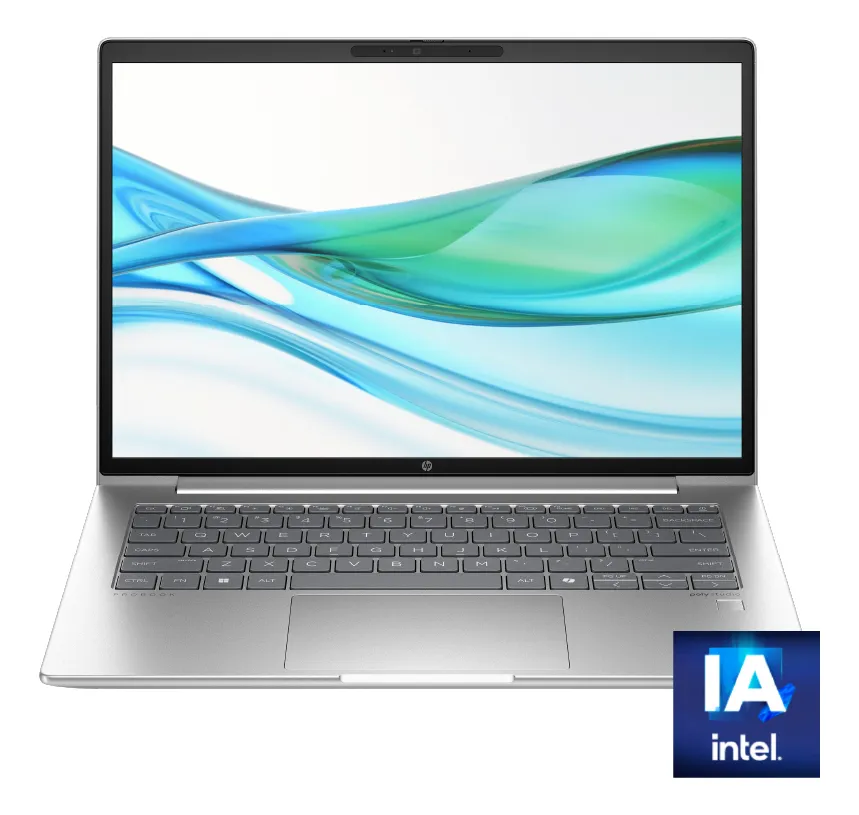
The HP ProBook 440 G11 aims at buyers who want a 14-inch laptop that feels built for real work rather than for show, combining a modern Intel Core Ultra chip, 16 GB of memory, fast solid-state storage, and a screen format that is better suited to documents, spreadsheets, and long hours of everyday use.
Yes, this configuration makes sense if you need a portable, business-leaning laptop for office work, multitasking, web apps, and frequent travel. It is a weaker fit for gaming, advanced creative workloads, or anyone expecting a luxury multimedia machine with standout display quality and premium extras.
The HP ProBook 440 G11 sits in an interesting place. It is not trying to be the thinnest ultrabook on the shelf, and it is not pretending to be a workstation either. What it offers instead is a more disciplined mix of portability, useful screen space, modern processing, and a work-first design that should appeal to professionals, students in demanding academic routines, and small business buyers.
This matters because many laptops look strong on a spec list and still disappoint in daily use. With this model, the real question is not whether the processor is new enough. It is whether the full package matches the kind of work you actually do. That is where this review becomes more useful than just reading the headline specs.
What this HP ProBook 440 G11 is really built for
The first thing to understand is the role of this machine. The ProBook line is usually designed for people who need consistency more than spectacle. That means stable everyday performance, a practical chassis size, solid port selection in many regional versions, and a general focus on productivity rather than entertainment.
In this configuration, the combination of Intel Core Ultra 5 125U, 16 GB RAM, and a 512 GB SSD puts the laptop in a comfortable zone for business and study. It should feel quick when handling browser-heavy workflows, Microsoft 365, cloud dashboards, messaging apps, video meetings, PDF work, and light photo or content tasks. It is the kind of laptop that is supposed to reduce friction, not impress people across the room.
The 14-inch size is also part of the appeal. It is large enough to work seriously without feeling cramped, but still easier to carry than a 15.6-inch machine. On a desk, in a backpack, or during a commute, that balance usually matters more than buyers expect before they live with a laptop every day.
The buying mistake people make with laptops like this
The biggest buying mistake here is assuming that a business-style laptop automatically behaves like a premium all-rounder. That is not always true. Many buyers see the ProBook name, the Core Ultra branding, and the AI PC label, then imagine a machine that excels equally in work, content creation, media, and gaming. That is not the right expectation.
This configuration is much easier to appreciate when you judge it for the right job. It is a productivity-first device with integrated graphics, not a creator notebook with a high-end display and not a gaming system with thermal headroom for demanding titles. If you buy it for focused work, it makes sense. If you buy it hoping it will replace a gaming laptop or a creative laptop with a stronger screen, it may feel underwhelming.
There is another practical point that matters a lot. Some buyers hear “ProBook” and assume they are getting the full business software posture they would expect from corporate fleets. This specific listing uses Windows 11 Home, not Windows 11 Pro, so that difference should not be ignored. For many personal users that is fine. For IT-managed environments, it is something to check before ordering.
Where this setup feels strong in daily work
The strongest part of this laptop is how balanced the core configuration looks for everyday productivity. Sixteen gigabytes of RAM is where a modern work laptop stops feeling fragile. You can keep many browser tabs open, jump between documents, join video calls, edit presentations, and keep background apps running without feeling like the machine is constantly near its limit.
The 512 GB SSD also lands in a sensible place. It is enough for most users who keep a local library of files, install a healthy number of applications, and still want breathing room. It will not feel endless, but it avoids the cramped feeling that cheaper storage options often create after a few months.
The 16:10 screen ratio is another quiet advantage. It sounds minor until you use it. For reading, writing, spreadsheets, research, and business tools, the extra vertical space tends to feel more useful than the wider but shorter layouts still found on many mainstream laptops. You scroll a little less, you see more of a document at once, and the machine feels more work-oriented.
Portability also helps the ProBook 440 G11. A 14-inch laptop in this class is usually chosen by people who move around, work between home and office, or need a machine that can stay in a bag without becoming annoying. That kind of portability does not make headlines, but it improves ownership over time.
What can feel average after the first week
The areas that deserve caution are also clear. If you are used to premium consumer laptops with brighter displays, stronger speakers, thinner bezels, higher color coverage, or more polished webcam systems, this model may feel more functional than exciting. That is not a flaw by itself, but it changes the emotional experience of using it.
The display, while practical, is not positioned as a creator-grade panel. It should be good enough for office tasks, streaming, browsing, and general use, but it is not the kind of screen you buy for serious color-sensitive visual work. Designers, photographers, and editors who care deeply about panel quality may quickly start wanting more.
The same caution applies to graphics. Integrated Intel graphics are perfectly acceptable for daily work, lighter visual tasks, and some casual gaming, but they are not built for modern AAA gaming or heavier GPU-dependent creative applications. You can get through the basics, but that is different from feeling comfortable under sustained load.
Keyboard and webcam details also deserve a second look before purchase because ProBook 440 G11 variants can differ by market and configuration. This matters if you care about a backlit keyboard, higher-end conferencing features, or a more premium camera experience. Buyers who treat those details as non-negotiable should verify them carefully with the exact seller listing.
How the hardware changes the experience
On paper, the Intel Core Ultra 5 125U is a modern efficiency-focused processor, and that matters in the right kind of laptop. This is not a chip designed to turn a thin 14-inch business notebook into a brute-force performance machine. Instead, it aims to provide responsive day-to-day computing, solid multitasking, and improved power behavior in a portable chassis.
That makes the processor a smart fit for the rest of the machine. A laptop like this benefits more from smooth office performance, quick wake times, fast app launches, and steady behavior during long work sessions than from benchmark numbers that only matter in specialized workloads. In practical terms, it should feel comfortably fast for the majority of users who spend their days in browsers, office suites, communication tools, and cloud software.
The AI PC label also needs a realistic interpretation. It is useful to know that the Core Ultra platform supports newer AI-oriented workloads and modern conferencing enhancements, but that should not be the main reason you buy this notebook. The meaningful value here is not that it suddenly becomes an on-device AI powerhouse. The value is that it is built on a newer platform that should age more gracefully as mainstream software leans further into AI-assisted features.
The 14-inch WUXGA IPS display supports the productivity angle well. The resolution is sharp enough for comfortable everyday use, the anti-glare treatment is a welcome choice for work environments, and the 16:10 format makes the screen feel more practical than many standard 16:9 panels. It is not a luxury display, but it is a sensible one.
Weight and size also reinforce the identity of the machine. This is the type of laptop that should be easy to carry to meetings, cafés, classrooms, and shared workspaces without making you feel like you brought your desk with you. That is one of the most important differences between a laptop that looks good in a listing and one that remains pleasant to own.
Buy this if your work looks like this
This configuration makes the most sense for people whose daily routine revolves around productivity rather than specialized performance. That includes office professionals, remote workers, consultants, graduate students, administrators, sales staff, and business owners who spend most of their time moving between browser tabs, documents, spreadsheets, calls, presentations, and internal systems.
It also fits buyers who want something more serious than an entry-level consumer laptop but do not want to jump into a heavier and more expensive mobile workstation category. If your workload is steady, mixed, and professional rather than heavily creative, the ProBook 440 G11 lands in a very practical sweet spot.
There is also a case for buyers who value a less flashy design. Some people simply prefer a laptop that looks appropriate in meetings, travels well, and focuses on getting out of the way. For that audience, the ProBook concept usually ages better than a trend-driven consumer machine.
Skip it if your priorities look different
This is not the right laptop for every kind of buyer. If you mainly want the best screen quality you can get for visual work, you should probably look elsewhere. If you want stronger gaming performance, you should definitely look elsewhere. If you edit large media projects every week, work with demanding creative software all day, or expect a highly premium entertainment experience, this model is likely too conservative.
You may also want a different machine if your buying decision is heavily driven by features like a high-end webcam, richer speakers, OLED-level display contrast, or a more luxurious overall feel. The ProBook 440 G11 is better understood as a disciplined business tool than as an indulgent lifestyle device.
And if you specifically need business deployment features tied to Windows 11 Pro environments, do not gloss over the operating system difference in this listing. That detail alone may change whether this is a great choice or the wrong one.
How it compares with nearby options
Against many consumer 14-inch laptops, the ProBook 440 G11 usually wins on practicality. The layout is more work-focused, the screen ratio is better for documents, and the general identity is more aligned with professional use. You trade some visual flair for day-to-day seriousness, which is often the right trade for people who use a laptop as a tool first.
Against thinner premium ultrabooks, the ProBook usually feels less glamorous but more grounded. Premium ultrabooks often chase lighter bodies, flashier screens, and a more polished entertainment experience. The ProBook approach is more about dependable office behavior, functional design, and a configuration that avoids obvious weak points like too little memory.
Against performance-focused laptops, the gap is obvious. Those machines are better for gaming, rendering, heavier editing, and sustained intensive work. But they are usually larger, louder, and less convenient if your real life is built around email, dashboards, reports, research, and meetings. Choosing between them should come down to your actual routine, not to spec envy.
Where this configuration lands
The HP ProBook 440 G11 with Core Ultra 5, 16 GB RAM, and 512 GB SSD is a sensible laptop, and that is meant as praise. It does not try to win through spectacle. It wins by avoiding the most common mistakes that make work laptops annoying: too little memory, cramped storage, awkward portability, and outdated platform choices.
Its limits are also easy to understand. The display is aimed at productivity, not image work. The graphics are fine for general use, not serious gaming. The business branding should not distract you from checking the exact operating system and feature mix in the listing. But if you buy it for the right reasons, those caveats feel manageable rather than fatal.
In other words, this is the kind of laptop that makes the most sense when you want competence, portability, and modern everyday performance more than excitement. For many buyers, that is exactly the right kind of machine to choose.
Questions buyers still ask before checking out
Is the HP ProBook 440 G11 good for office work and multitasking?
Yes, it is. With a Core Ultra 5 processor, 16 GB RAM, and SSD storage, this configuration is well positioned for browser-heavy work, office apps, video calls, cloud tools, and daily multitasking. It is much better suited to that routine than entry-level laptops that cut memory too aggressively.
Can the HP ProBook 440 G11 handle creative work?
Yes, for light creative work. It should be fine for basic image editing, simple design tasks, and content preparation, but it is not the strongest choice for heavy editing, advanced motion work, or color-sensitive professional creation. Buyers with visual-first workloads will usually want a stronger display and more graphics headroom.
Is this a good laptop for students?
Yes, especially for students with demanding routines. It suits research, writing, presentations, remote classes, spreadsheets, and multitasking very well. The portable 14-inch format also helps. It makes the most sense for university users and advanced students who want a laptop that feels closer to a professional tool than a basic campus machine.
Does the 14-inch screen feel too small for serious work?
No, not for most people. A 14-inch display with a 16:10 layout usually feels more usable than older 14-inch laptops with a shorter screen shape. You still get portability, but the extra vertical space improves document work, web browsing, and spreadsheets in a way that makes the machine feel more productive.
Is the HP ProBook 440 G11 a gaming laptop?
No, it is not. The integrated graphics and work-oriented design make it better for productivity than for modern gaming. Casual and lighter titles are a different story, but anyone shopping with gaming as a real priority should look at a machine with stronger dedicated graphics and a more performance-focused design.
Does the AI PC label change the buying decision?
Not by itself. The newer Intel platform does help the laptop feel more current and better prepared for AI-enhanced software features, but that should be a secondary advantage rather than the main reason to buy. The real buying case is still portability, multitasking comfort, and everyday work performance.
Is Windows 11 Home a problem on a ProBook?
It depends on your use case. For many personal buyers, freelancers, and students, Windows 11 Home is perfectly acceptable. For managed business environments, domain-heavy workflows, or buyers expecting a more corporate deployment posture, that detail deserves attention before purchase because some users will strongly prefer Windows 11 Pro.
If your goal is to buy one laptop that can travel easily, stay responsive through a serious workday, and avoid the obvious compromises of cheaper machines, the HP ProBook 440 G11 is easy to understand. It gets the foundation right, which is often more important than having one flashy headline feature.
If your expectations are more specialized, especially around gaming, premium display quality, or creative performance, you will likely outgrow it faster. But for the buyer who wants a reliable 14-inch work companion with a modern platform and a balanced configuration, this is a thoughtful and practical choice.