A practical look at Samsung’s 8.7-inch tablet for streaming, browsing, video calls, reading and everyday use.
The Galaxy Tab A11 is worth considering if you want a compact Android tablet for simple daily tasks, entertainment, study support and casual browsing. It makes the most sense for users who value portability, Samsung’s familiar interface, expandable storage and a smoother display over heavy performance. It is not the best choice for demanding games, advanced creative work or replacing a laptop.
The Galaxy Tab A11 review starts with a clear idea: this is not a tablet built to impress power users. It is designed for people who want a convenient screen that is bigger than a phone, easier to carry than a laptop and simple enough for everyday routines.
That makes the buying decision more about expectations than hype. If you need a compact tablet for watching videos, reading, checking messages, browsing the web, attending video calls and using basic apps, the Galaxy Tab A11 has a coherent proposal. If you expect premium display quality, desktop-level productivity or high-end gaming, it can feel limited.
What the Galaxy Tab A11 tries to do well
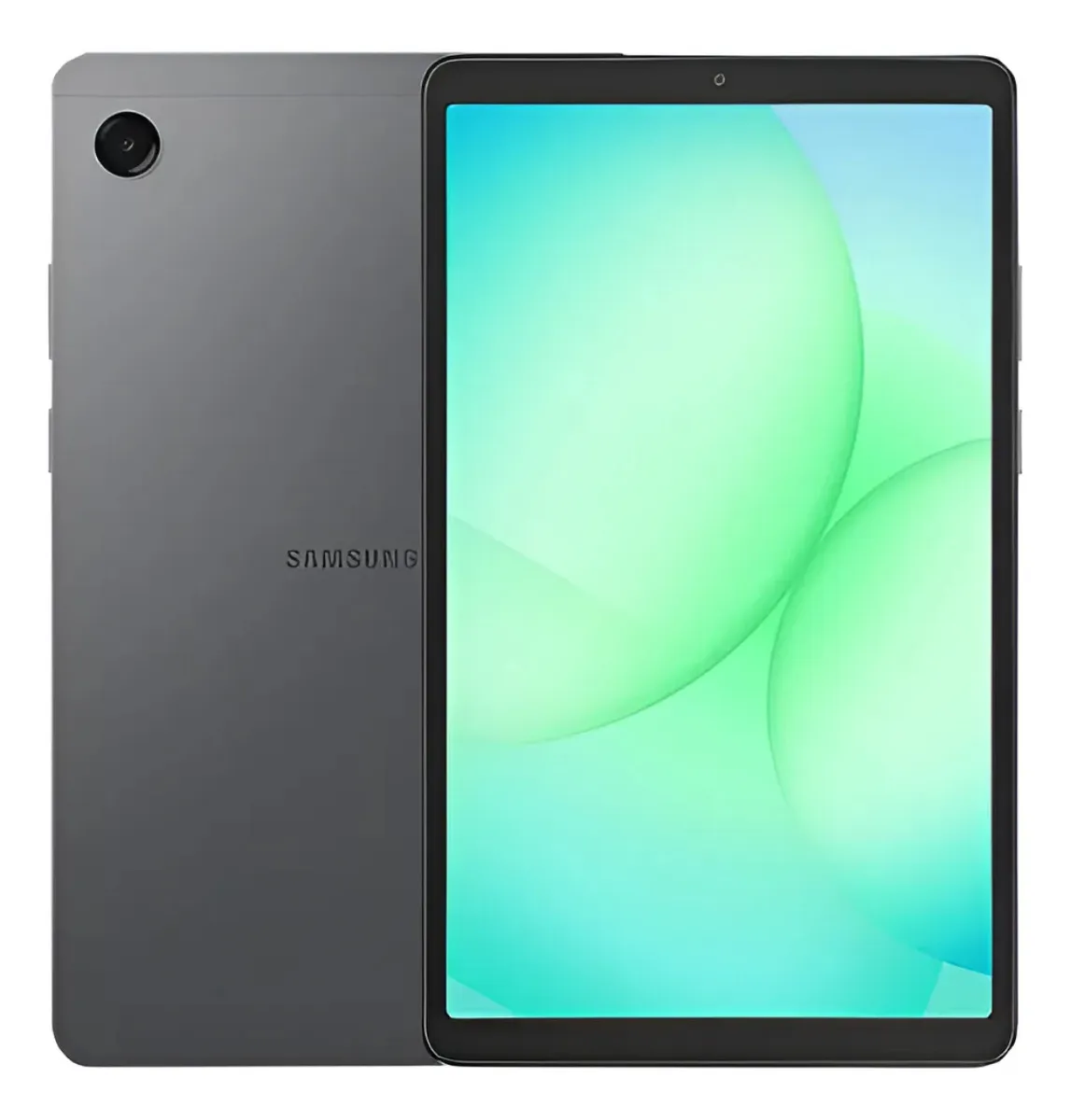
The Galaxy Tab A11 is a compact Android tablet with an 8.7-inch screen, 64 GB of storage, 4 GB of RAM and a 5,100 mAh battery. Its main appeal is the balance between portability, simple entertainment and the Samsung Galaxy ecosystem.
The 8.7-inch size is one of its strongest practical points. It is large enough to make videos, web pages and documents more comfortable than on a smartphone, but still small enough to hold with one hand for reading or casual browsing. This matters if the tablet will move between the sofa, bed, desk, bag and kitchen counter.
The screen uses a 1340 x 800 resolution and supports a 90 Hz refresh rate. That combination is not positioned as premium, but it can make scrolling and basic navigation feel smoother than older entry-level tablets with lower refresh rates. For social media feeds, news sites and app menus, this is a real everyday advantage.
The tablet also includes dual speakers tuned with Dolby support and a 3.5 mm headphone jack. That may sound simple, but it is useful for users who still prefer wired headphones, children who use basic headsets, or anyone who wants to watch content without relying only on Bluetooth accessories.
Storage is another important part of the value. The 64 GB version is enough for light app use, documents, some media and normal Android operation, but it should not be treated as unlimited. The microSD expansion support is the practical safety net, especially for photos, downloaded videos, music and offline files.
The screen size is the first decision point
The biggest mistake when buying the Galaxy Tab A11 is assuming that every tablet works for the same type of use. The compact 8.7-inch format is comfortable and portable, but it also defines the limits of the experience.
This size is excellent for users who want something light for quick access. It fits well into routines where a full-size tablet may feel too large, such as reading in bed, following recipes, checking school content, watching short videos or keeping a small device nearby for entertainment.
However, the same compact format may feel restrictive for users who plan to edit documents for long periods, split the screen often, draw with precision, work with spreadsheets or replace a notebook. The display is bigger than a phone, but it does not create the same workspace as an 11-inch or larger tablet.
The 1340 x 800 resolution is acceptable for casual use, but it is not the kind of panel aimed at users who demand very sharp text at all times, high-end color reproduction or a premium viewing experience. It is better understood as a practical everyday screen than a cinematic or professional display.
The 90 Hz refresh rate improves the feeling of movement, especially when scrolling. Still, refresh rate does not replace resolution, brightness quality, color accuracy or processor power. It is a useful feature, but it should not be the only reason to buy the tablet.
For entertainment, the Galaxy Tab A11 works best when expectations are realistic. It is suitable for streaming, online classes, casual browsing and reading. It is less suitable for users who want a large screen for multitasking, detailed creative work or a more immersive movie experience.
Where the Galaxy Tab A11 feels useful in daily life
The Galaxy Tab A11 can be a strong fit for everyday routines because it focuses on common tasks rather than advanced performance. That is exactly where compact tablets often make the most sense.
For streaming, the screen size is comfortable enough for personal viewing. It is especially useful when a smartphone feels too small but opening a laptop feels unnecessary. The dual speakers help create a better experience than relying on a single small speaker, although headphones will still be better in noisy environments.
For reading, the compact body is an advantage. Ebooks, articles, PDFs with simple formatting and web pages are easier to handle on an 8.7-inch tablet than on many larger models. The size makes it more natural to hold for longer sessions.
For students, the tablet can work well as a secondary device. It can handle digital books, learning platforms, video lessons, note viewing and basic research. It should not be treated as a full productivity machine, but it can be useful alongside a phone or computer.
For video calls, the 5 MP front camera is a practical feature. It is not aimed at professional content creation, but it is enough for casual calls, family conversations, online classes and basic meetings. The front camera placement and audio environment will still affect the experience, so good lighting and a stable connection remain important.
For families, the Galaxy Tab A11 also makes sense as a shared casual device. It can be used for entertainment, communication, browsing and simple learning apps. The expandable storage helps if multiple users save media files, though app management will still be important on the 64 GB model.
- Good fit for streaming, reading and browsing.
- Useful size for travel, school bags and home routines.
- Expandable storage helps with offline media.
- Wired headphone support is convenient for simple setups.
- Samsung’s Android interface is familiar and easy to understand.
Where expectations should stay realistic
The Galaxy Tab A11 has clear strengths, but it also has limits that matter before buying. The 4 GB of RAM is suitable for light and moderate use, but it is not ideal for heavy multitasking or keeping many demanding apps active at the same time.
Users who jump between several apps, keep browser tabs open, run games and use messaging apps constantly may notice the limits faster. The tablet can feel smooth in simple navigation, but it is still an entry-level to mid-basic device in practical behavior.
The 64 GB storage also deserves attention. Part of the storage is used by the system and preinstalled software, so the full advertised capacity is not available for personal files and apps. If the user downloads many games, streaming content, large PDFs or offline videos, storage expansion becomes more important.
The screen is functional, but not premium. The TFT panel can be perfectly acceptable for everyday content, but buyers who care deeply about contrast, vivid colors and very sharp image quality may prefer a higher-tier tablet. This is a point of attention for movie lovers and visual creators.
The rear 8 MP camera should be treated as a utility camera. It can scan documents, capture quick references and handle simple photos, but it is not the reason to choose this tablet. Most modern smartphones will offer a better camera experience.
The USB 2.0 connection also reinforces the practical nature of the product. It is fine for charging and basic data transfer, but it is not aimed at fast professional workflows. Users who move large files frequently should not expect the same convenience found in more advanced devices.
Performance, storage and battery in real use
The Galaxy Tab A11 uses an octa-core processor with speeds listed up to 2.2 GHz and 2.0 GHz, paired with 4 GB of RAM in this version. In practice, this configuration is best suited to everyday apps, video platforms, web browsing, messaging, light school tasks and casual games.
The tablet should feel most comfortable when used with one main task at a time. Watching a video, reading an article, checking email, opening a learning app or browsing a store should match its intended profile. The experience becomes less ideal when the user expects fast switching between many heavier tasks.
The 64 GB internal storage is serviceable for a basic tablet, but it requires some discipline. Apps, system files and cached content can gradually reduce available space. The microSD card support up to 2 TB is one of the most practical features, especially for media storage.
It is important to understand that microSD expansion is better for files than for solving every app-storage problem. Photos, videos, music, documents and offline content are good candidates for external storage. Heavy apps and games can still pressure the internal storage depending on how Android and each app manage installation data.
The 5,100 mAh battery fits the compact proposal. Battery life will depend heavily on brightness, streaming, gaming, Wi-Fi signal, background apps and video-call usage. For light daily use, it should be enough for a comfortable routine, but gaming and high brightness will drain it faster.
The camera setup is simple: an 8 MP rear camera with autofocus and a 5 MP front camera. Video recording reaches Full HD at 30 frames per second. This is adequate for calls, basic documentation and simple recordings, but not for users who want a tablet primarily for photography or content production.
The tablet also includes location support through major satellite systems, USB-C connectivity, dual speakers and a headphone jack. These details make it more versatile in daily use, especially for users who want a straightforward device without needing extra accessories for every situation.
The type of user who will enjoy this tablet most
The Galaxy Tab A11 makes the most sense for someone who wants a compact, familiar and practical Android tablet. It is a good match for users who do not need advanced hardware, but still want a device from a well-known brand with a clean everyday experience.
It is especially suitable for people who mainly consume content. Streaming, reading, online shopping, browsing, social media, recipes, children’s learning apps, video calls and simple note viewing are all reasonable use cases. In these scenarios, the tablet’s portability becomes a strength.
It can also work well as a first tablet for users who are not sure whether they need a larger or more expensive device. The compact format makes it easy to adopt, and the feature set covers the basics without unnecessary complexity.
For older users, the larger screen compared with a smartphone can make reading and video calls more comfortable. For younger users, the size is easier to handle than larger tablets. For travel, it is more convenient than carrying a laptop just to watch content, read or browse.
The Galaxy Tab A11 is also interesting for people who already use Samsung phones. The interface will feel familiar, and Smart Switch support can make the transition easier when moving data from another device. This does not mean it is only for Samsung users, but the ecosystem familiarity is a practical advantage.
When another tablet may be the smarter choice
The Galaxy Tab A11 is not the best choice if the tablet will be used as a main work device. Users who expect serious multitasking, large document editing, spreadsheet work, external monitor workflows or a laptop-like setup should look for a larger and more powerful model.
It may also disappoint demanding gamers. Casual games should be within its profile, but heavier titles can expose limits in RAM, graphics performance and thermal behavior. A smoother screen does not automatically mean high-end gaming performance.
Creative users should also be careful. If the priority is drawing, photo editing, video editing or precise visual work, the compact screen and basic panel are not ideal. A larger display, stronger processor and better accessory ecosystem will matter more.
Users who want a premium entertainment tablet may prefer a model with a higher-resolution display, stronger speakers, more RAM and a larger screen. The Galaxy Tab A11 is comfortable for personal entertainment, but it is not built to deliver a flagship media experience.
It is also not ideal for someone who installs many large apps and games without managing storage. The microSD support helps, but it does not completely remove the need to manage internal space. Heavy app users should consider a configuration with more internal storage or a higher-tier model.
How it compares with larger and more powerful alternatives
Compared with larger tablets, the Galaxy Tab A11 wins on portability. It is easier to carry, easier to hold and more convenient for quick sessions. This matters for users who want a tablet that feels casual and always nearby.
Larger tablets usually feel better for productivity and immersive entertainment. They provide more room for split-screen use, documents, video timelines, drawing, remote work and long reading sessions with complex layouts. If the tablet will stay mostly on a desk, a larger screen can be more comfortable.
Compared with more powerful Android tablets, the Galaxy Tab A11 is simpler. Higher-tier models can offer more RAM, stronger processors, sharper displays, better accessory support and more comfortable multitasking. Those upgrades matter for users who need performance instead of convenience.
Compared with very basic no-name tablets, the Galaxy Tab A11 has the advantage of Samsung’s ecosystem, familiar software experience, recognizable build direction and more predictable everyday usability. For many buyers, that confidence is part of the decision.
Compared with a smartphone, the Galaxy Tab A11 offers a better reading and viewing experience. Compared with a laptop, it is much more limited for production tasks. Its best position is between those two devices: a compact screen for easy consumption, light communication and simple digital routines.
The right comparison is not only about specifications. It is about how the device will be used. If the tablet will live in a backpack, on the couch, beside the bed or in a family room, the Galaxy Tab A11 has a clear role. If it will become a work machine, another category will fit better.
The buying decision comes down to portability and simple use
The Galaxy Tab A11 is a sensible tablet when the buyer wants a compact Android device for everyday entertainment and light tasks. Its 8.7-inch display, 90 Hz refresh rate, expandable storage, dual speakers, headphone jack and familiar Samsung interface create a practical package.
The main reason to choose it is convenience. It is not trying to be the most powerful tablet, the sharpest screen or the best productivity device. It is trying to be easy to carry, easy to understand and good enough for the tasks most people do casually.
The main reason to avoid it is ambition. If your tablet needs to handle demanding games, advanced multitasking, professional editing, heavy document work or premium media quality, the Galaxy Tab A11 is not the most future-proof option.
For the right user, though, its simplicity is not a weakness. It is exactly what makes it useful. It is a tablet for browsing, streaming, studying lightly, calling, reading and keeping digital life more comfortable than it would be on a small phone screen.
Is the Galaxy Tab A11 good for watching movies and series?
Yes, the Galaxy Tab A11 is good for personal streaming and casual video watching. The 8.7-inch screen is more comfortable than a phone, and the dual speakers help with entertainment. It is not a premium cinema-style tablet, but it works well for everyday viewing in bed, on the sofa or while traveling.
Does the Galaxy Tab A11 have enough storage?
Yes, the 64 GB version is enough for light use, but storage management is important. System files and apps reduce the available space, so users who download many videos, games or large documents should use a microSD card. The expandable storage is one of the tablet’s most practical advantages.
Is the Galaxy Tab A11 good for students?
Yes, the Galaxy Tab A11 can be good for students who need a secondary device for reading, video lessons, research and learning apps. It is not ideal as the only device for heavy schoolwork, long document editing or complex multitasking. It works best alongside a phone or computer.
Can the Galaxy Tab A11 replace a laptop?
No, the Galaxy Tab A11 should not be seen as a laptop replacement. It is better for content consumption, simple communication and light tasks. Users who need keyboard-heavy work, large documents, spreadsheets, advanced multitasking or professional apps should choose a larger and more powerful device.
Is the Galaxy Tab A11 suitable for gaming?
Yes, the Galaxy Tab A11 is suitable for casual games, but not for demanding gaming. Its hardware profile is focused on everyday use, not high-performance graphics. Simple titles, puzzle games and light entertainment should fit better than heavy games that require stronger processing and more memory.
Is the Galaxy Tab A11 camera good?
Yes, the cameras are useful for basic needs, but they are not a highlight. The front camera is practical for video calls, while the rear camera can scan documents or capture quick references. For high-quality photos and videos, a modern smartphone will usually deliver better results.
Who should buy the Galaxy Tab A11?
The Galaxy Tab A11 is best for users who want a compact tablet for browsing, streaming, reading, video calls and simple daily apps. It fits families, students, casual users and people who want a bigger screen than a phone without carrying a large tablet.
Who should avoid the Galaxy Tab A11?
Users who need advanced performance should avoid the Galaxy Tab A11. It is not the best match for heavy multitasking, serious gaming, professional editing, large spreadsheets or replacing a notebook. A larger tablet with more RAM and a stronger processor will be a better fit for those needs.
The Galaxy Tab A11 is a good purchase when the goal is clear: a compact Samsung tablet for simple, comfortable and portable everyday use. It is strongest as a personal entertainment screen, reading device, video-call companion and light study tool.
It becomes less convincing when judged as a power device. The 4 GB of RAM, compact display and basic camera system are reminders that this model is built for convenience, not advanced performance.
For buyers who understand that balance, the Galaxy Tab A11 offers a practical and coherent experience. Choose it if portability, expandable storage, smooth scrolling and everyday usability matter more than premium display quality or laptop-level productivity.